
Solution
Assess Microsoft 365 Copilot readiness before deployment, not after.
EtherInsights scores readiness across licences, governance, sensitivity labels, sharing and Purview, then gives IT teams and MSPs named actions and review evidence for each tenant.
From £0.79 per active user/month · 14-day free trial
Card required to start. Connect your tenant in minutes.
5 vectors
scored: licensing, labels, sharing, Purview, governance
14 days
to evaluate EtherInsights, card required to start
Repeatable
at MSP scale with consistent evidence shape across tenants

Updated 15 August 2026
Free self-assessment
How ready is your Microsoft 365 estate for Copilot?
Copilot works within existing permissions, so oversharing and old access gaps that were invisible before can surface in its answers the day it goes live. Answer 7 quick questions about licensing, data governance, and security to see where your estate stands. Takes about two minutes, nothing leaves your browser, and this is a fast self-reported triage step, not a scan of your actual tenant.
0–49%
Not yet ready
50–79%
Ready for a controlled pilot
80–100%
Ready to scale
The problem
Copilot readiness is hard because the signals are spread out.
A Microsoft 365 Copilot readiness assessment reviews licensing prerequisites, data governance, sensitivity labels, sharing posture and Purview coverage before rollout. EtherInsights combines those signals into a readiness score with named findings, proposed actions and review evidence. The score informs the rollout decision; it does not guarantee that deployment is risk-free.
Copilot can surface forgotten data
Microsoft 365 Copilot works within existing permissions. Overshared or poorly governed documents, mail and chat can still affect its results and make old access gaps more visible.
Sensitivity labels are often inconsistent
Label coverage can vary by site, team, and document type. Measure the real posture before you assume the policy is working.
Oversharing builds up over time
External links, broad site access, and old permissions accumulate over years. The go-live state may not match the written policy.
Per-seat licensing has to match real users
Copilot is licensed per seat. Check likely users before assigning licences so spend and value line up.
What changes
Outcome blocks
Readiness score across the five vectors
A clear readiness score across licences, governance, labels, sharing, and Purview, based on the real tenant state.
Named owner per gap
Each finding has an owner and a proposed fix, so readiness work can move instead of stalling in a spreadsheet.
Evidence trail for the deployment review
A repeatable evidence trail for the rollout review, with the same structure across tenants.
Start here
Make Copilot readiness clear before go-live.
See this working on your own tenant.
Guides and analysis on this topic
The readiness view
One Copilot readiness score across the five vectors.
The assessment checks five areas: licences, data governance, sensitivity labels, sharing, and Purview. The output is a readiness score, owner-backed actions, and evidence for the rollout review.
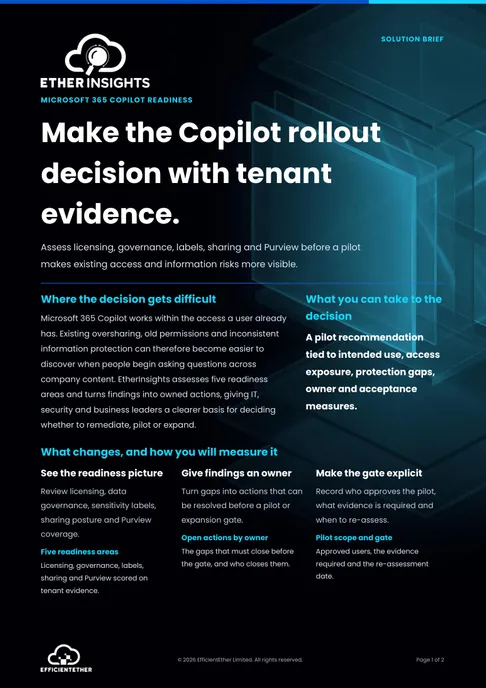
Solution brief
Microsoft 365 Copilot Readiness Solution Brief
Two pages on this decision: what to measure, who has to sign it off, and what should be true before you commit. Free, and written to be forwarded.
Get the solution briefVideo walkthrough
See Copilot readiness evidence.
A focused walkthrough of readiness evidence across licensing, governance, labels, sharing posture, and Purview coverage.
- Assess readiness before deployment.
- Connect readiness gaps to owners and evidence.
- Use the security route when conformity is in scope.
How we deliver it
Product mapping
EtherInsights leads this route with readiness scoring across licences, governance, labels, sharing, and Purview. EtherAssist can help when teams need workflow support to close gaps.


Where this fits
- Pre-deployment readiness scoring before a Microsoft 365 Copilot rollout.
- Licence right-sizing so Copilot seats go to likely users.
- Sensitivity-label checks across sites, teams, and document types.
- Oversharing and external-access review before users start prompting.
- MSP readiness reports across many tenants with one evidence format.
FAQ
Questions teams ask before scheduling a Copilot readiness assessment.
Keep the evaluation grounded in scope, speed, multi-tenant fit, and how readiness signals translate into owner-led remediation.
What is a Copilot readiness assessment?
A Copilot readiness assessment checks what needs attention before a Microsoft 365 Copilot rollout. It reviews licences, sensitivity labels, sharing and external access, Purview coverage, and data governance, then returns a readiness score with owner-backed actions for the deployment review.
Which licences does Microsoft 365 Copilot require?
Microsoft 365 Copilot is included in Microsoft 365 E7 and is available as a per-user add-on for other eligible plans. Eligibility, prerequisites, and some Purview capabilities can change, so confirm the current Microsoft setup guidance. The readiness assessment checks licence context before seats are assigned.
How do I check for oversharing before deploying Copilot?
Review sharing and access before go-live: broad site permissions, anyone-links, external guests, and stale access that Copilot could surface in a single prompt. EtherInsights measures the real sharing posture across sites, teams, and files, flags the widest exposure, and turns each finding into an owner-backed fix ahead of rollout.
Why is Copilot readiness its own assessment?
Copilot readiness is different from a standard security baseline. Labels, sharing, Purview, governance, and licences all matter at the same time. A focused assessment helps you fix gaps before users go live.
What does it actually check?
It checks five areas: Microsoft 365 licences, sensitivity labels, sharing and external access, Purview coverage, and data governance. Each finding includes an owner-backed action, not just a score.
What happens after the readiness assessment?
The customer or MSP reviews the score, assigns owners, applies the agreed tenant changes and re-checks the evidence before rollout. EtherInsights proposes actions and tracks evidence; it does not apply tenant changes automatically.
Can an MSP run this across multiple tenants?
Yes. MSPs can run readiness checks across customer tenants with a consistent evidence format.
Does EtherInsights remediate or just report?
EtherInsights scores readiness and proposes owner-led fixes with evidence. The customer or MSP applies tenant changes. EtherAssist can help when the fix needs a controlled workflow.
Is there a Copilot readiness assessment tool UK organisations and MSPs can use to check if a tenant is ready?
Yes. EtherInsights runs a Copilot readiness assessment across a Microsoft 365 tenant: it checks licences, sensitivity labels, sharing and external access, Purview coverage, and data governance, then returns a readiness score with owner-backed actions before rollout. It works the same way for a UK organisation running the assessment directly or an MSP running it consistently across customer tenants.
Copilot readiness sources and supporting guides
Microsoft Learn sources support the platform prerequisites, permissions model and native readiness reporting below. Reviewed 15 August 2026.
Related solutions
Related glossary terms
Start here
Make Copilot readiness clear before go-live.
Start with a focused assessment across licences, labels, sharing, Purview, and governance. Get owners and evidence ready before rollout.
- EtherInsights pricing is public: £0.79 / $1 / €1 per active user, with volume pricing on request and a 14-day trial.
- Readiness signals across licences, labels, sharing, Purview, and governance in one view.
- Gaps become owner-backed actions with rollout-review evidence.
- Repeatable across tenants, so MSPs can use the same report shape at customer scale.