
Solution
Intune reporting tool for Microsoft Intune.
Your Intune data is all there. Getting it out is the cost. The weekly service pack means pulling the compliance, app, update, enrolment, and drift views again and pasting them into a spreadsheet. One failing device means opening the compliance, apps, updates, and security panes one by one. When the auditor asks how patching moved over the quarter, most native views only show today. EtherInsights is an Intune reporting tool for IT teams and MSPs. Microsoft Intune stays the management source. EtherInsights adds what native reports do not package: scheduled estate summaries, trends across weeks and months, multi-tenant views, software inventory, a per-device timeline, configuration backup, and drift evidence.
From £0.79 per active user/month · 14-day free trial
Card required to start. Connect your tenant in minutes.
~30
Intune report families in one operating view, so nobody rebuilds them from separate panes
Per-device
timeline for compliance, apps, updates, encryption, and risk, so one failing device is one page, not six
MSP-ready
multi-tenant reporting, exports, and stakeholder summaries with the same structure every cycle

Updated 1 September 2026
At a glance
How EtherInsights compares to native Intune reports and Power BI
Microsoft Intune stays the management source, and its native reports answer point-in-time admin questions well. The effort shows up when the same question has to be answered every week, across several customer tenants, or with a quarter of history behind it. Here is what changes per job.
| The job | Native Intune reports or Power BI route | With EtherInsights |
|---|---|---|
| Find out why one device keeps failing an app install | Check the device, apps, updates and security panes in turn, then piece the sequence together by hand. | One per-device timeline across compliance, apps, updates, encryption, certificates and risk, so a failing device is one page instead of six. |
| Build the same service pack every week | Repeat the exports each cycle, or stand up a Log Analytics or Power BI pipeline that someone has to own. | Scheduled estate summaries and recurring stakeholder packs with the same structure every cycle. |
| Report across several customer tenants | The admin centre is tenant-focused, so each customer is reviewed and exported on its own. | Multi-tenant views, customer-level filtering and MSP report packs from one place. |
| Produce evidence for a compliance review | Export the relevant reports to CSV, reformat them, and assemble the evidence pack by hand. | Audit-ready packs showing the affected users and devices, the assigned owner, and how the number moved. |
| Spot stale or non-compliant devices before users report them | Most native views are point-in-time, so drift surfaces when somebody happens to look. | Trend comparison across weeks and months, plus configuration drift against a pinned baseline. |
| Hand a manager a report they can read | CSV downloads, or a Power BI model your team builds on the Intune Data Warehouse and keeps maintained. | Exportable, stakeholder-ready summaries reused in service reviews and QBRs, with no data model to maintain. |
Comparison
Native Intune reports vs EtherInsights
Native Intune reporting is strong for point-in-time admin questions. EtherInsights packages the same endpoint signals into scheduled, trended, audit-ready evidence. Use this table as a first-pass comparison for an Intune reporting tool evaluation.
| Capability | Native Intune reports | EtherInsights |
|---|---|---|
| Scheduled exports | One-off exports; recurring packs need manual rebuilds or a Log Analytics pipeline | Scheduled estate reports and recurring stakeholder packs with the same structure every cycle |
| Multi-tenant reporting | Tenant-focused admin centre, one customer at a time | Multi-tenant views, customer filtering, and MSP report packs |
| Historical retention | Varies by report type; many views are point-in-time | Reporting snapshots and trend comparison across weeks and months |
| Software inventory visibility | Discovered apps and install status per workload view | Software inventory and app deployment reporting connected to devices, users, and next actions |
| Troubleshooting depth | Signals spread across separate device, app, update, and security panes | Per-device timeline across compliance, apps, updates, encryption, certificates, and risk |
| Audit evidence | Manual export, reformatting, and evidence assembly | Audit-ready report packs with owner context and trend movement |
| Export formats | CSV downloads for most report views | Exportable, stakeholder-ready summaries reused across service reviews and QBRs |
The problem
Where native Intune reporting stops, and what it costs you each cycle.
Native Intune reports are good at point-in-time admin questions. They are not built for the recurring work: the weekly service review, the cross-tenant comparison, the device investigation, and the audit question about what changed. Each of those means repeated exports and manual correlation, and the engineer time goes on the same rebuild every cycle. EtherInsights adds the reporting and evidence layer. Microsoft Intune stays the management source.
Retention windows limit trend evidence
Native Intune reporting is excellent for current status. Retention varies by report type and reporting path. That makes long-running audit preparation hard when you need to show how non-compliance, patch backlog, app failures, or enrolment exceptions moved over several service cycles. EtherInsights keeps repeatable reporting snapshots and review-ready summaries. Teams can compare movement across weeks and months, show whether actions worked, and stop rebuilding trend evidence from old exports.
MSPs need cross-tenant reporting
The Intune admin center is tenant-focused. That works for one customer and creates friction for an MSP supporting many. Operators need to see which customers have the highest non-compliance, which update rings are falling behind, and where the same deployment issue repeats. EtherInsights gives MSP teams a multi-tenant reporting layer, customer-level filtering, common report packs, and consistent evidence they can reuse in QBRs and service reviews.
Scheduled exports need operational packaging
Native exports help during an investigation. Recurring stakeholder reporting turns into spreadsheet assembly. The same compliance, app, update, enrolment, and drift views are pulled again each week, reformatted, and pasted into service packs. EtherInsights turns Intune reporting into scheduled summaries you can share, with the same structure, owner context, trend movement, and next action every time.
Historical trending needs more than a point-in-time report
A point-in-time report shows today's device count. Leadership and service owners ask whether things are getting better. EtherInsights adds historical comparison for non-compliant devices, failed deployments, patch progress, enrolment health, and configuration drift. The report shows direction of travel, highlights cohorts that are improving or stuck, and points effort at the risk that is not moving.
Per-device troubleshooting needs full context
One device issue can involve compliance policy, update state, encryption, managed apps, certificates, Defender posture, CVE exposure, and user assignment. When the helpdesk opens each view separately, triage slows down and escalations lose context. EtherInsights puts those signals on one per-device timeline. The team can see what changed, which policies apply, what failed recently, and which evidence to pass to the next resolver group.
Configuration drift needs baseline evidence
Reporting gaps become risk when policies change and nobody can show what moved. A profile edit, an assignment change, or a Conditional Access tweak can explain a support spike, but the evidence is scattered. EtherInsights combines Intune reporting with configuration backup, pinned baselines, and drift visibility. Teams can compare the approved state with the current state, review the change evidence, and prepare a controlled rollback conversation when needed.
What changes
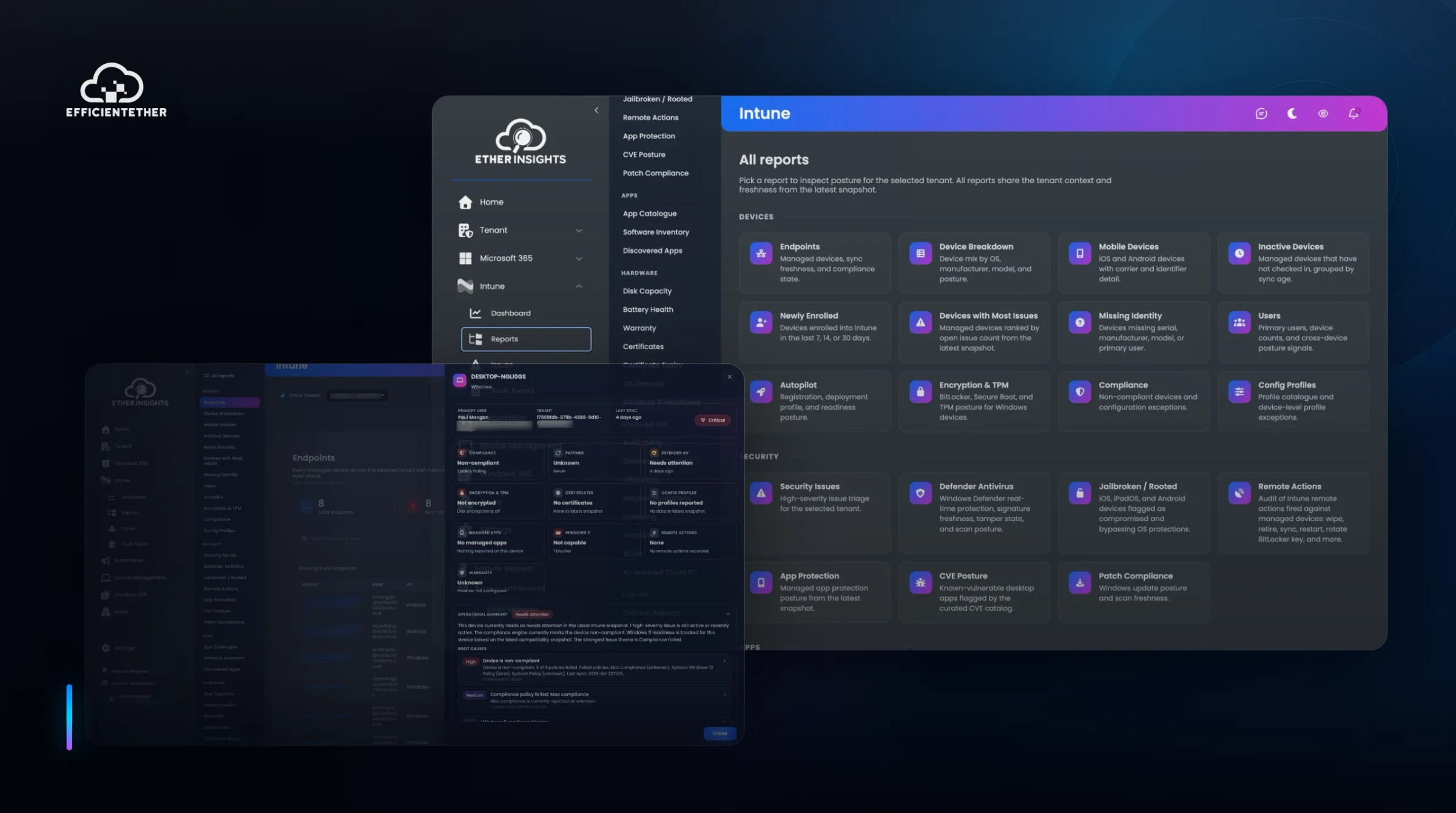
Intune report catalogue in EtherInsights.
Device compliance reporting
See compliant, non-compliant, not evaluated, in grace period, and policy-gap devices with owner-ready evidence for audit preparation, exception handling, and service reviews. EtherInsights goes past the raw status count. It shows the affected devices and users, the policy context, repeated patterns, and the remediation queue that needs attention before the next governance checkpoint.
Native view: compliance status is point-in-time, so exception trends and audit history must be rebuilt from old exports.
App deployment status
Track managed app installs, failures, pending deployments, required assignments, and app cohorts that are not landing as expected. Endpoint teams can separate a broad packaging or assignment issue from a one-device support case. The output is a focused remediation queue for failed installs, missing apps, and groups that need a deployment review.
Native view: install failures are visible per app, but estate-wide software inventory summaries and week-on-week failure trends need manual export work.
Update rings and patching
Review Windows update ring progress, driver update status, patch backlog, failed update cohorts, and devices that have stopped moving through the expected update path. Teams can prepare weekly patch posture summaries, spot rings that need adjustment, and show stakeholders whether update risk is falling across the managed estate.
Native view: update reports show current ring state; backlog movement across cycles is hard to evidence without exports.
Enrolment and onboarding
Find enrolment failures, stale devices, Autopilot blockers, ownership mismatches, platform gaps, and devices not reporting in the expected management state. The result is a cleaner onboarding view for IT admins and MSPs, especially when new starters, device refreshes, acquisitions, or customer onboarding create short-lived reporting noise.
Native view: enrolment failures surface per device, and short-lived onboarding noise is hard to separate from real blockers.
Configuration profiles
Report profile assignment, success, conflict, error, and not applicable states, then connect each profile issue to the devices and users affected. EtherInsights shows whether an issue is isolated, policy-wide, assignment-led, platform-specific, or part of a wider configuration drift event, so the profile report leads to a service action.
Native view: profile state is listed per profile, so cross-profile drift patterns take manual correlation.
Drift and configuration backup
Keep a record of Intune and Microsoft 365 configuration baselines, detect drift from the approved state, and prepare restore evidence when a policy change introduces risk. Security, operations, and MSP service teams get a clear way to explain what changed, why it matters, and which baseline to use for review.
Native view: Intune does not keep an approved-baseline comparison, so change evidence is scattered across audit logs.
Per-device timeline
Open a device and review compliance, updates, apps, encryption, TPM, certificates, Defender state, CVE exposure, check-in signals, and recent reporting changes in one troubleshooting surface. The timeline helps the support team pick the next action: user contact, device sync, policy review, app redeployment, patch remediation, or escalation.
Native view: device signals sit in separate panes, so triage means opening compliance, apps, updates, and security views one by one.
Start here
Stop rebuilding the same Intune report every week.
See this working on your own tenant.
The reporting view
Intune reports, device context, and configuration drift in one operating surface.
Intune device, policy, compliance, app, and update data feeds EtherInsights reporting, configuration backup, drift analysis, and per-device troubleshooting, giving IT teams and MSPs repeatable evidence instead of one-off exports.
Solution brief
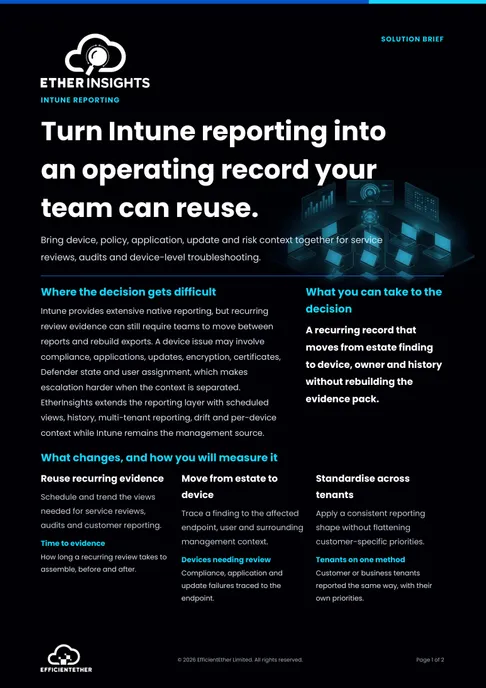
Intune Reporting Solution Brief
Two pages on this decision: what to measure, who has to sign it off, and what should be true before you commit. Free, and written to be forwarded.
Get the solution briefVideo walkthrough
See endpoint reporting evidence.
A focused walkthrough of Intune reporting, device risk, readiness, and endpoint evidence in EtherInsights.
- Move Intune reporting into one operating view.
- Connect device risk and readiness to next actions.
- Use the backup clip for recovery conversations.
Configuration clip
Backup and drift evidence for Microsoft 365 configuration.
Use this focused clip when the team is evaluating pinned baselines, drift detection, and recovery evidence.
Microsoft 365 tenant backup and drift recovery
See configuration backup, pinned baselines, drift detection, and recovery evidence for Microsoft 365.
How we deliver it
How teams use EtherInsights for Intune reporting.
EtherInsights is the reporting layer for IT admins, endpoint teams, MSP operators, and service owners. It is for teams that need Intune reporting they can repeat every week, explain in service reviews, and connect to device-level action. The native Intune admin center stays the management source. EtherInsights adds the evidence layer around it: scheduled reporting, trend movement, multi-tenant comparison, configuration backup, drift visibility, and per-device troubleshooting. That makes the reporting routine easier to repeat, defend, and improve. Use EtherAssist alongside it when follow-through needs workflow support, scripted remediation, or communications drafting.

EtherInsights is the operating view for Microsoft 365, Azure, and Windows 365: day-to-day cost management, licence control, and full Windows 365 Cloud PC lifecycle management, plus tenant, user, security, device, and Intune reporting.

EtherAssist gives IT and compliance teams the speed of AI without giving up data control, auditability, or practical governance. It supports troubleshooting, scripting, documentation, policy work, and repeatable internal support workflows.
Where this fits
- Find non-compliant devices before an audit. Open the compliance report and filter by platform, policy, ownership, or customer tenant. Review the affected users and devices. Use the device context to separate true failures from not evaluated devices, stale records, and assignment gaps. Export a stakeholder-ready list with owner context, likely remediation steps, and a clear view of what to fix before the evidence pack is finalised.
- Troubleshoot one user's device with full context. Open the device timeline and compare compliance, app deployment, update status, encryption, certificate, Defender, CVE, and check-in signals. Nobody has to keep the user waiting while several Intune panes are checked. The support team can see whether the problem is policy, group assignment, a missed check-in, an app failure, update backlog, or device health. Then they pass the evidence to the right resolver path.
- Schedule a weekly estate report to stakeholders. Select the device, app, update, enrolment, profile, and drift sections that matter for the service review. Send a recurring summary with the same structure every week. It highlights trend movement, calls out the largest risks, and shows which actions already have an owner. The report becomes a standing operating rhythm, not another manual export task.
FAQ
Intune reporting questions teams ask.
Short answers for IT teams and MSPs comparing native Intune reports with a dedicated Intune reporting tool.
What is Intune reporting?
Intune reporting is the set of reports, exports, and dashboards used to understand device compliance, app deployment, update status, enrolment health, policy state, and endpoint risk across Microsoft Intune. It turns raw endpoint signals into action lists for support, audit, service review, and governance work. Good Intune reporting answers four questions: what is affected, who owns it, is it improving, and what happens next.
What is an Intune reporting tool?
An Intune reporting tool extends native Intune data with views that are easier to repeat, schedule, trend, and share. The useful ones do not just copy data into another table. They package compliance, app, update, enrolment, profile, drift, and device context into reports. IT teams and MSPs use those reports in weekly service reviews, customer updates, audit preparation, and device troubleshooting. EtherInsights adds that reporting layer around Intune.
How long does Intune keep report data?
Microsoft documents retention by report type and reporting path, not as one universal period. For example, Microsoft Learn states that the Device actions report holds data for the past 180 days. Windows driver update reporting data stays available for six months after the last update event. For longer-term evidence, use exported reports, Azure Monitor or Log Analytics where configured, and a reporting layer such as EtherInsights that keeps review snapshots.
Can I schedule Intune reports?
Native Intune reports can be generated and exported. Specialist reporting can be built with Azure Monitor or Log Analytics where configured. Many teams still need a simpler rhythm for recurring service packs, MSP reviews, and leadership updates. EtherInsights fills that gap. It turns Intune reporting into scheduled estate summaries, recurring stakeholder packs, and report sets that nobody has to rebuild by hand each week.
How do MSPs report across multiple tenants?
MSPs need one consistent reporting model across customer tenants, not a separate manual review for each. In practice that means comparing customers, filtering by tenant, producing customer-specific packs, and spotting common endpoint risks across the supported base. EtherInsights gives MSP operators multi-tenant reporting, customer-level filtering, recurring report packs, and shared evidence for QBRs, service reviews, renewal conversations, and risk discussions.
What Intune reports should I review before an audit?
Start with device compliance, devices without a compliance policy, configuration profile status, app deployment status, update and patch posture, encryption or BitLocker state, enrolment health, policy assignment, stale devices, and configuration drift. Show more than the status count. Show which users and devices are affected, which owners are assigned, and what remediation evidence exists. EtherInsights groups those signals so audit preparation becomes a repeatable checklist.
How does Intune reporting help device troubleshooting?
Troubleshooting improves when the report connects a device issue to its context. That context is user assignment, compliance policy, profile state, app deployment, update ring, encryption, certificate, Defender, vulnerability signals, and recent check-in activity. Without it, a support engineer can chase the wrong symptom. EtherInsights puts the context on a per-device timeline, so the support team moves faster and escalates with evidence.
Can EtherInsights report on Intune configuration drift?
Yes. EtherInsights combines Intune reporting with configuration backup, pinned baselines, and drift detection. Teams can see what changed, when it changed, and which policies or devices may be affected. That helps after a support spike, a failed rollout, an unexpected compliance change, or an audit question. The drift evidence supports review, rollback planning, and governance conversations without relying on memory.
What is the best Intune reporting tool?
The best Intune reporting tool depends on your operating model. Evaluate candidates on coverage across compliance, apps, updates, enrolment, profiles, and device context; on scheduled reporting, historical trending, and multi-tenant reporting; and on export quality and clear next-action evidence. EtherInsights is a strong fit when you need Intune reporting tied to Microsoft 365 estate control, MSP reporting, device troubleshooting, configuration backup, and drift visibility.
Does EtherInsights replace the Intune admin center?
No. The Intune admin center stays the native management experience for policy, device, app, and configuration administration. EtherInsights extends the reporting and evidence layer around it: repeatable reporting, trend evidence, device context, and drift visibility. IT admins keep using native management. Service owners, MSP operators, and stakeholders get clearer reporting outputs.
Does Microsoft Intune have a reporting tool?
Yes. Microsoft Intune includes native reports in the Intune admin centre for device compliance, app deployment, update status, enrolment, and policy state. CSV export and Graph-based reporting are there for specialists. Many IT teams and MSPs add a dedicated Intune reporting tool such as EtherInsights on top. They need scheduled report packs, historical trending, multi-tenant views, software inventory visibility, and audit-ready evidence, which point-in-time native reports do not package on their own.
What is the difference between Intune reporting and Power BI reporting for Intune?
Native Intune reporting answers operational questions inside the admin centre. Power BI reporting for Intune usually builds on the Intune Data Warehouse. That warehouse stores daily snapshots, keeps most fact tables for around 30 days, and connects through an OData feed your team models and maintains. It suits custom analytics projects. EtherInsights sits between the two. It is a packaged Intune reporting tool with scheduling, longer trend evidence, multi-tenant views, and device troubleshooting context. Your team does not build or maintain its own Power BI reports.
Still finding out about failed devices from the helpdesk queue?
Bring one policy or app that keeps failing and, in a short walkthrough, we will show you how EtherInsights surfaces the affected devices, the reason, and who owns the fix. Prefer to prepare first? The free monthly reporting workbook lists what your report needs to answer before the next review.
Intune reporting sources and definitions
Microsoft documents retention by report and data path rather than as one universal period. These first-party references support the time-sensitive figures above; glossary links explain the terms used on this page.
Related solutions
Related glossary terms
Start here
Stop rebuilding the same Intune report every week.
Bring one recurring report pack, one audit question, or one failing device. We run it through EtherInsights beside your current export process, so your team can compare time to evidence, clarity of ownership, and trend context. Start with a walkthrough, or start the 14-day trial on your own tenant. A card is required to start, and nothing changes in Intune.
- EtherInsights pricing is public: £0.79 / $1 / €1 per active user, with volume pricing on request and a 14-day trial.
- Around thirty Intune report families, configuration backup, drift analysis, and device deep dive in one operating view. Endpoint teams do not move between separate panes to explain the estate.
- Scheduled reporting and exportable evidence cut the time spent rebuilding weekly service, audit, and stakeholder packs, and keep the same structure from one cycle to the next.
- Per-device timelines connect compliance, apps, updates, encryption, certificates, Defender, CVE exposure, and configuration state to next actions. Escalations are easier to explain and easier to own.
- Multi-tenant reporting lets MSPs compare customers, isolate recurring endpoint issues, and prepare service review packs without rebuilding the same Intune exports for every tenant.
- Configuration backup and drift visibility give teams a practical evidence trail when a policy, profile, or assignment change affects devices after a rollout.