
Solution
Right-size Azure virtual machines before yesterday's peak becomes tomorrow's bill.
Azure VMs are often left sized for migration, launch, or worst-case demand. EtherInsights helps teams spot oversized and idle compute, validate safe changes, and produce savings evidence owners can act on.
From £0.79 per active user/month · 14-day free trial
Card required to start. Connect your tenant in minutes.
10-20%
recurring Azure savings often available from right-sizing and reclaim
Owner-led
each resize candidate needs a technical owner and decision trail
Evidence first
utilisation, cost, and dependency context before change

Updated 14 August 2026
Get a ballpark right-sizing estimate
Enter your current monthly Azure VM spend for a rough planning range. The calculator’s default assumption is that right-sizing and reclaim recover 10-20% of VM spend where sizing has never been reviewed, and less where it was reviewed recently; adjust the review answer to match your estate. This is a quick planning number, not an audit: connect your tenant for the real figure, backed by evidence.
Enter your monthly spend above to see an estimate.
Illustrative only: the range comes from the calculator’s default assumptions, not from your actual usage, reservations, or discounts. What drives the low and high end is how long your VMs have run without a sizing review and how many unattached disks and stale snapshots have built up. Connect your tenant in EtherInsights to get your real number, with utilisation evidence and an owner-backed action list.
Get my real number freeThe problem
Azure VMs stay oversized because nobody wants to break production for a small-looking saving.
Azure virtual machines often stay sized for yesterday's peak, an old migration assumption, or a cautious launch window. Finance sees the monthly charge, but IT needs workload evidence, ownership, and a safe action path before resizing compute.
Sized for an old peak
Compute was increased for a migration, launch, test cycle, or seasonal spike, then never reviewed against current utilisation.
Evidence is split
Cost, CPU, memory, uptime, owner, and workload context sit in separate views, so resize decisions take longer than they should.
Risk slows action
Teams hesitate to resize, shut down, or schedule VMs when the dependency picture is unclear or nobody owns the final decision.
What changes
Turn compute waste into controlled actions.
Prioritised right-size candidates
Surface VMs where cost and utilisation suggest the current SKU no longer fits the workload.
Owner-backed review
Attach each candidate to the right technical or service owner before the change becomes a ticket or governance action.
Savings evidence
Keep before-and-after cost, decision notes, and follow-up evidence ready for finance, IT leadership, and MSP review.
Start here
Find the VMs that are still charging for an old assumption.
See this working on your own tenant.
Guides and analysis on this topic
The VM sizing view
Move from high bills to safe compute decisions.
EtherInsights connects cost, utilisation, ownership, and review evidence so VM changes are not treated as blind cost cuts. Resize, schedule, reserve, or keep decisions land with context.
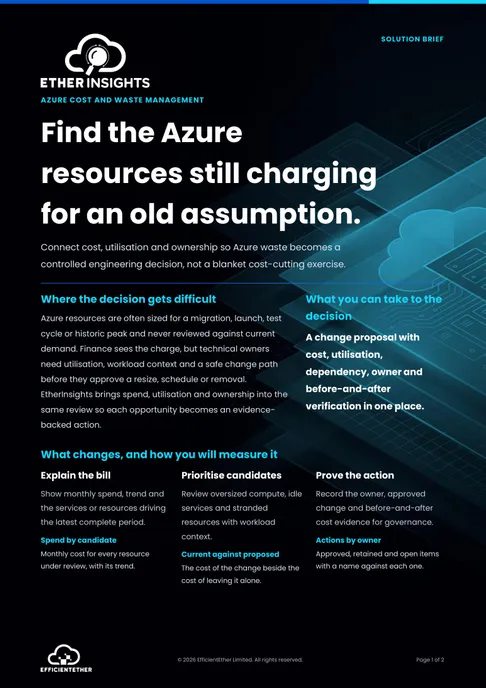
Solution brief
Azure Cost and Waste Solution Brief
Two pages on this decision: what to measure, who has to sign it off, and what should be true before you commit. Free, and written to be forwarded.
Get the solution briefVideo walkthrough
See Azure cost evidence in context.
Use the cloud cost walkthrough to see how Azure spend, right-sizing evidence, and owner-backed actions fit inside the wider savings review.
- Identify oversized and idle compute.
- Separate safe changes from risky assumptions.
- Keep VM savings inside the wider cost-control rhythm.
How we deliver it
EtherInsights leads the sizing review.
Use EtherInsights when Azure VM cost needs more than a bill export: utilisation evidence, owner context, right-size candidates, idle compute signals, and savings reports. Use the broader cloud cost optimisation route when the review also covers licences, storage, Cloud PCs, reservations, or subscription ownership.

EtherInsights is the operating view for Microsoft 365, Azure, and Windows 365: day-to-day cost management, licence control, and full Windows 365 Cloud PC lifecycle management, plus tenant, user, security, device, and Intune reporting.
Where this fits
- Azure subscriptions with virtual machines sized for old migration or launch assumptions.
- Development, test, or project VMs that may be idle, oversized, or always-on unnecessarily.
- MSP or internal FinOps reviews that need owner-backed evidence before resize actions.
- Finance-led cost reviews where Azure compute spend needs a defensible technical action plan.
FAQ
Questions IT and finance ask about Azure VM sizing.
Plain answers on spotting oversized virtual machines, choosing a new SKU with confidence, automating the review, and keeping the evidence an approver will ask for.
What is Azure VM right-sizing?
Right-sizing means matching each Azure virtual machine to the work it actually does, rather than the size it was first deployed at. Most estates carry VMs picked during a migration or a project peak and never revisited, so they run at a fraction of their capacity while billing at full rate. Right-sizing moves them to a smaller SKU, or shuts down the ones nothing is using.
How do I right-size an Azure VM step by step?
Collect at least two weeks of CPU, memory, disk and network metrics so a quiet fortnight does not mislead you. Rank instances by the gap between provisioned and used capacity. Pick a candidate SKU in the same family to keep the workload profile predictable. Confirm the change with the application owner, schedule it in a maintenance window, then re-measure after a full business cycle.
How do I find oversized Azure VMs?
Look for sustained low CPU and memory against provisioned capacity, disks far larger than the data on them, and machines with no recent sign-in or session activity. Azure Advisor surfaces some of this. EtherInsights adds the part that usually stalls the work: it names an owner for each candidate and tracks the saving from recommendation through to approval.
Can Azure right-sizing be automated?
The analysis can be fully automated, and it should be, because it is a continuous measurement problem rather than a one off audit. The resize itself is better kept human approved. An automatic downsize on a workload with a seasonal peak or an undocumented dependency is how right-sizing programmes lose the trust of application owners.
What metrics should I use to size an Azure VM?
Percentile values, not averages. A machine averaging twenty percent CPU can still hit ninety five percent at month end, and an average hides that completely. Use P95 for CPU and memory across a full billing cycle, add disk IOPS and throughput for data workloads, and check network for anything chatty.
Does right-sizing apply to Azure App Service?
Yes, and it is often overlooked because App Service plans are bought once and rarely revisited. Look at the plan tier against actual request volume and memory use, consolidate underused apps onto a shared plan, and scale down non production slots. The method is the same as VMs even though the levers differ.
How much can Azure VM right-sizing save?
It depends entirely on how much of the estate was sized during a migration and never reviewed, so a headline percentage is not useful. Measure your own tenant instead. The honest way to size the prize is to rank candidates by monthly cost and only count the ones an owner has agreed to change.
What is the difference between right-sizing and reserved instances?
Right-sizing reduces what you consume. Reservations reduce what you pay for the consumption you have committed to. Do them in that order, because reserving capacity you are about to eliminate locks in the wrong baseline for one to three years.
How do I right-size Windows 365 Cloud PCs?
Cloud PCs are sized per licence rather than per machine, so the question becomes which users are on a larger Cloud PC than their work needs, and which are provisioned but not signing in. Review usage per user against the assigned Cloud PC size, then adjust at the licence level. EtherInsights reports Cloud PC usage alongside Azure VM sizing so the two are reviewed together.
How often should Azure VM sizing be reviewed?
Quarterly for a stable estate, monthly if you are actively migrating or scaling. The important part is that it is a standing review with an owner rather than a project. Estates drift back toward oversized within a couple of quarters once the attention moves elsewhere.
How does Azure decide a VM is oversized?
Azure's own Advisor recommendations monitor CPU and outbound network usage for seven days and flag VMs running at 5% CPU or less, with 7MB or less outbound network, for four or more days as low-utilisation. That's the underlying signal Microsoft ships by default; the review and owner sign-off around that signal, not the metric itself, is what turns a flagged VM into an approved change.
Does right-sizing overlap with Azure Hybrid Benefit?
No, they're complementary. Right-sizing changes the VM's compute tier to match actual usage; Azure Hybrid Benefit reduces the cost of that VM's Windows Server or SQL Server licence by applying licences you already own under Software Assurance. Applying Hybrid Benefit to an oversized VM still leaves the sizing waste in place, so do both, not either.
Azure VM right-sizing sources
Reviewed 25 August 2026.
Related solutions
Related glossary terms
Start here
Find the VMs that are still charging for an old assumption.
Start with an Azure VM sizing review and turn oversized or idle compute into a short, owner-backed savings action list.
- VM right-sizing sits inside the same savings rhythm as Azure cost optimisation, so actions do not drift away from governance.
- Cost and utilisation evidence is tied to owners before anyone is asked to approve a change.
- Resize, schedule, reserve, or keep decisions are framed as controlled actions rather than blanket cost cuts.
- How we measure this: the figures on this page come from first-scan findings in EtherInsights, matched to real sign-in, service, and utilisation data, not from industry surveys. Your own tenant sets the number, and the savings report gives it to you with the evidence.