
EfficientEther

Solution

Modernise the applications on your Citrix estate, not just the platform.

Citrix Virtual Apps and Desktops and Citrix DaaS deliver MSIX packages and MSIX app attach natively. The platform side of a Citrix refresh is usually well understood; the applications running on it, some packaged as App-V years ago, others with the installer long gone, are the part that stalls migration. EtherApps Forge captures those applications from a live install, even when the original installer is missing, and produces a signed MSIX or MSI that Citrix delivers the same way it always has.

7-day free trial of the full workflow · licences include training and support

No credit card. Capture a real application on day one.

Watch with the full transcript

Read the transcript
  1. An older application can hold up a Citrix refresh,
  2. especially when its installer is missing.
  3. EtherApps Forge captures it from the machine where it runs.
  4. It can also extract an existing App-V package and rebuild it as MSIX.
  5. Sign, validate and test the package,
  6. then prepare it for your Citrix delivery environment.
  7. Try Forge free for seven days. No card needed.
No rebuild
Citrix Virtual Apps and Desktops already delivers MSIX and MSIX app attach natively
No installer
rescue legacy and App-V apps when installation media is lost or the vendor portal is gated
Low cost, self-serve
a 7-day Forge trial on one real app instead of a partner-led packaging project

The problem

Why the application backlog survives every Citrix refresh.

Plain version: the Citrix environment gets refreshed or consolidated, but several published applications were packaged as App-V years ago, or as a plain native install with the original media long gone, and nobody wants to be the one who breaks a working session-host app. IT version: a Citrix Virtual Apps and Desktops or DaaS estate carries a backlog of App-V and native-install applications with unclear dependencies, uncertain behaviour under multi-session isolation, and no fast route to a modern package format. Both versions need the same answer: capture what is actually installed, convert it to a package Citrix already knows how to deliver, and do it without a full repackaging project per app.

  • App-V packages are ageing out

    App-V was Citrix's most common packaging route for years before MSIX became the modern standard. The original sequencer project is often long gone, leaving a working App-V package that nobody can safely rebuild or extend.

  • The installer for the underlying app is missing

    Whether the app was originally delivered as App-V, a native install, or a published desktop app, the source installer frequently disappeared years before anyone needed to repackage it, so a from-scratch rebuild starts with detective work, not packaging.

  • Session-host behaviour makes teams cautious

    An app that works fine in App-V isolation can behave differently once containerised as MSIX on a multi-session VDA, so packaging teams often delay the move rather than risk breaking a published app that hundreds of users depend on.

  • Repackaging looks like a bigger project than the platform refresh

    Teams will happily plan a Citrix version upgrade or DaaS migration, but a parallel repackaging project for every legacy or App-V app on the estate is enough to make the whole migration slip, especially when packaging skills are scarce.

What changes

What good looks like after the assessment

  • A real inventory of what each App-V or legacy package actually does

    Forge captures the application's files, registry, services, and dependencies from a live install, whatever format it currently ships in, giving you a documented footprint instead of a package nobody wants to open.

  • A signed MSIX or MSI, ready for Citrix

    The capture becomes a signed MSIX or MSI package. Citrix Virtual Apps and Desktops and Citrix DaaS deliver MSIX and MSIX app attach natively today, so there's no Citrix-specific packaging format to learn.

  • A modernisation path that doesn't block the platform refresh

    Legacy and App-V applications stop being the reason a Citrix version upgrade or DaaS migration gets delayed, because the application side of the work runs on its own track.

  • A lower-cost route than a partner-led packaging project

    A 7-day EtherApps Forge trial on one real application tests the approach before committing to a wider repackaging programme, instead of starting with a quote-only packaging engagement.

Forge Capture with An installed app selected, ready to capture 7-Zip File Manager.

Capture from running systems

Forge Capture records files, registry, AppData, services and dependencies from a running Windows system when installer media is missing or incomplete.

Start here

Stop letting the application backlog hold back the Citrix refresh.

See this working on your own tenant.

Where Forge fits on a Citrix estate

Capture the application, not the platform, then let Citrix deliver it as it always has.

Forge captures the installed application footprint from a live machine or controlled VM, whether it currently ships as App-V, a native install, or something undocumented. That capture becomes a signed MSIX or MSI, which Citrix Virtual Apps and Desktops delivers through its native MSIX and MSIX app attach support, no Citrix-specific packaging format required.

Forge Anvil

Rebuild published apps as MSIX.

Capture the apps your published desktops rely on, rebuild them as MSIX, and review each package before it moves to Azure Virtual Desktop or Windows 365.

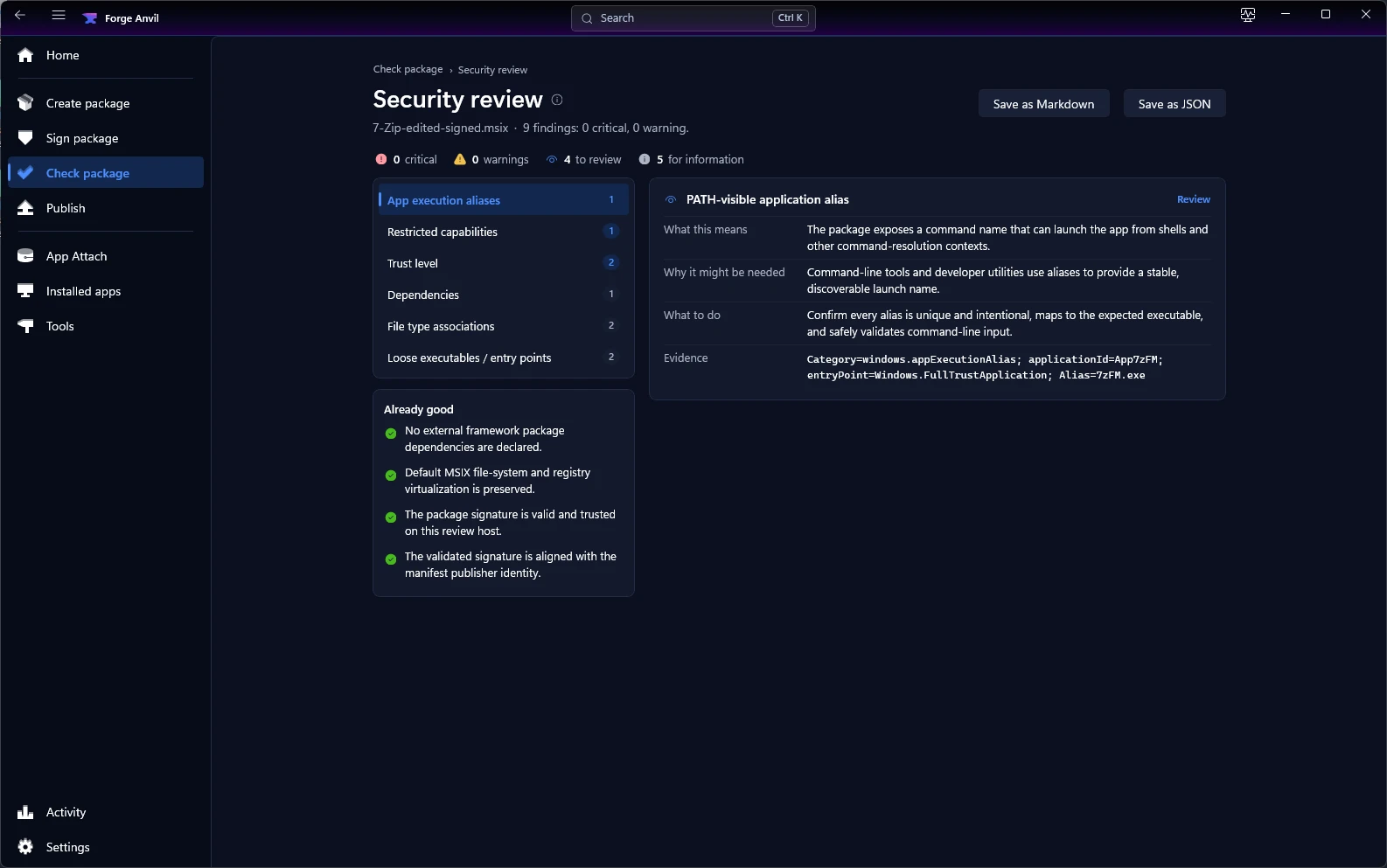
Security review in Forge Anvil: findings by category, with what each one means and what to do.

Publish to the people who need it

Assign apps in Intune to users, devices or groups, which is how they reach Windows 365 Cloud PCs. Publish App Attach images to Azure Virtual Desktop and Parallels RAS, and assign them. Windows 365 Cloud Apps and third-party support are in preview.

Built for x64 and ARM64

Forge Anvil runs natively on x64 and ARM64 PCs, without emulation. It builds MSIX and MSI packages for either, and its App Attach images are verified on both.

Comes with the 7-day free trial and every licence.

Walkthrough

See the same capture-first packaging that feeds Citrix, Omnissa App Volumes, and Parallels RAS.

A short walkthrough of legacy app capture from a working machine, package output, and a Windows 11 compatibility verdict - the same signed MSI and MSIX output that Citrix, Omnissa App Volumes, and Parallels RAS all deliver natively.

How we deliver it

How EfficientEther covers this route

EtherApps Forge leads. Forge captures the application directly from a live install, whatever format it currently ships in (App-V, native install, or an existing published desktop app), and produces a signed MSIX or MSI from that capture. Citrix Virtual Apps and Desktops and Citrix DaaS already deliver MSIX and MSIX app attach natively, so the output publishes the same way any other Citrix-delivered application does today, once the Citrix Personalization component is in place on the VDA and the package sits on a UNC, SMB, or Azure File Share. EtherInsights joins where the same programme also needs broader Windows 365 or Azure Virtual Desktop migration planning alongside the Citrix modernisation work.

Where this route fits best

  • Ageing App-V packages with no available sequencer project: capture from a live install and convert to MSIX or MSI instead of rebuilding the sequence from scratch.
  • Citrix version upgrades or DaaS migrations stalled by application uncertainty: modernise the application backlog on its own track so the platform refresh isn't blocked.
  • Native-install applications published through Citrix with lost installer media: rescue from a working machine the same way as any other legacy app.
  • Multi-session VDA compatibility checks: verify how a captured app behaves under Citrix's shared session-host model before a wider rollout.
  • MSP-managed Citrix estates needing a repeatable, lower-cost packaging pass across several customer tenants.
  • Estates planning a future move to Windows 365 or Azure Virtual Desktop alongside Citrix, where the same MSIX or MSI capture carries forward.

Capture installed Windows applications, reduce packaging unknowns, and produce modern deployment-ready outputs faster.

7-day free trial of the full workflow · licences include training and support

90.68%1
of 3,261 cases produced an MSIX package
Microsoft Marketplace
Buy on the Microsoft invoice you already pay
ISO 27001, 9001, 42001
Certified for information security, quality, and AI management

Manage Windows 365 day to day, from deployment to configuration, drift, and migration evidence, and find Microsoft 365 and Azure waste and prove savings, all from the same operating view.

Learn more about EtherInsights

Questions

Questions buyers usually ask about modernising a Citrix estate.

Plain answers for IT leads and Citrix administrators planning an App-V or legacy app modernisation.

Ask us on a packaging fit check

No, and it doesn't need to. Citrix Virtual Apps and Desktops and Citrix DaaS already support MSIX packages and MSIX app attach natively, on .vhd, .vhdx, and .cim disk images. Forge's job is upstream of that: capture the legacy or App-V application from a live install and produce a signed MSIX or MSI, which Citrix then publishes the same way it publishes any other app package today.

Start here

Stop letting the application backlog hold back the Citrix refresh.

Book a Citrix app review and we'll walk through a real package on your estate, App-V, native install, or unclear, and show what a Forge capture and modern MSIX or MSI output would look like for it.

No credit card. Capture a real application on day one.

Why this route works

  • Capture-first packaging means an ageing App-V package with no sequencer project is no longer a rebuild-from-scratch problem.
  • Citrix Virtual Apps and Desktops and Citrix DaaS already deliver MSIX and MSIX app attach natively, so there's no Citrix-specific package format to produce and no new Citrix-only tool to adopt.
  • A low-cost, self-serve trial on one real application tests the approach before any wider, partner-led repackaging commitment.
  • The same MSIX or MSI capture also supports IntuneWin and standard AppAttach output, so the work carries forward if the estate later moves toward Windows 365 or Azure Virtual Desktop.
  1. MSIX at Scale: an automated packaging study of 3,261 Windows application cases. Preprint published on Zenodo, not yet peer reviewed. Applications came from catalogue searches, not a random sample. A smoke test is a first check, not proof of production readiness. EfficientEther builds EtherApps Forge and declares that interest. Read the published study