
Solution
Stop gathering the background on every repeat ticket.
Use agentic AI for IT operations to give L1 techs the background on tickets you've already solved. Triage runs the same way every time, across every client, without a senior engineer touching it - and nothing reaches a client environment without a named sign-off, so the liability stays with the person, not the AI.
14-day free trial
No credit card. Choose UK, EU, or US hosting on day one.
One workflow
runs across every client - no cross-tenant mistakes, no rebuilding from scratch
A name on every change
so when a client or acquirer asks who approved it, you have an answer, not a shrug
A change log on demand
when an auditor asks what changed in a tenant, you pull a record - you don't rebuild one
The problem
What it actually costs you today.
Your techs are fast. But every repeat ticket still takes 20 minutes of background work before anyone touches it. Multiply that across 30 clients and it's where your margin disappears. And when a client escalates or an auditor asks what changed in their tenant, your team is reverse-engineering Slack and ticket notes instead of pulling a record.
Repeat work eats senior time
Your best engineers still gather background on tickets you've solved a dozen times, hours you can't bill at senior rates.
Ungoverned AI lands on your E&O
If a generic AI tool goes sideways in a client tenant, the incident lands on your NOC documentation, and potentially your E&O.
Audit trails get reconstructed too late
When a client asks for a change log, your team reverse-engineers Slack messages and ticket notes, a compliance and trust problem at once.
Due diligence sees everything
If you're positioning your MSP for acquisition or carrying SOC 2 or ISO clients, your operational documentation is part of your valuation.
What changes
What changes
Repeat tickets stop costing senior hours
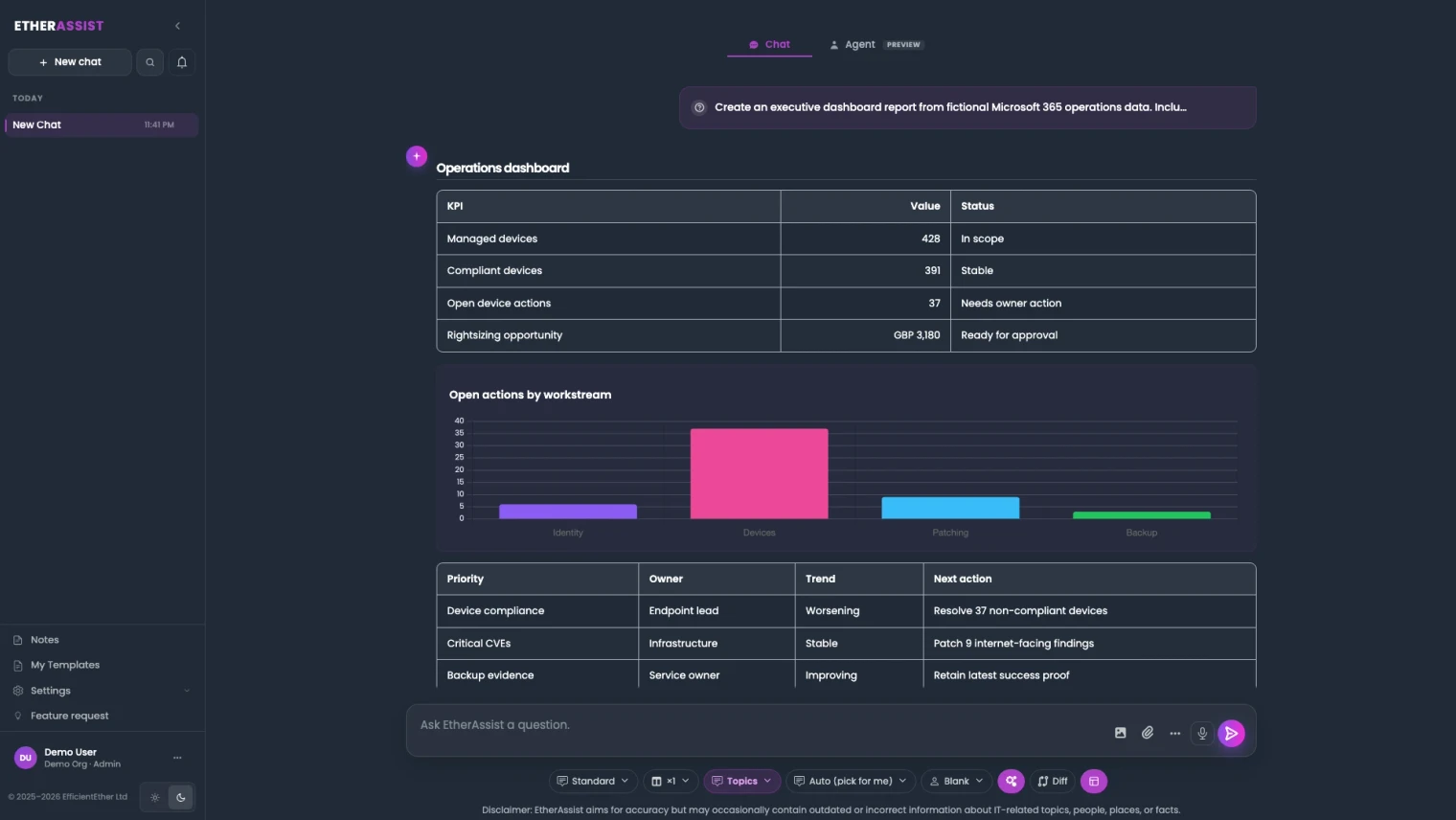
Your L1 tech opens a ticket and the workflow has already pulled the relevant background, flagged the classification, and drafted the next step. So your senior engineer reviews a recommendation, not a blank page.
Every action has a name on it
Every workflow moves through real steps: who's assigned, who approved, what ran, and what the output was. So you can hand a client a clean record instead of an explanation.
Audit evidence already exists
Every run logs the decision, the approver, and the output as it happens. When a client or auditor asks, you're not reconstructing history. You're pulling a record.
More volume at the same headcount
Your team handles more ticket volume at the same headcount. The human sign-off stays. The margin drain doesn't - and you're not the one explaining a change when something goes wrong.
Start here
Pick one repeat workflow. Start there.
See this working on your own tenant.
How the workflow runs
Same workflow, every client. No cross-tenant mistakes.
A ticket or finding starts a run inside one client's environment. The workflow pulls the background, drafts the next step, and waits for a named technician to approve it. The action runs, the evidence captures, and the record is already there when a client or auditor asks what changed.
Walkthrough
See repeat work move at MSP scale.
Watch EtherAssist take a repeat ticket from L1 triage to approved action, with the change log captured along the way.
How we deliver it
Is this the right starting point?
If repeat tickets are where your senior hours are disappearing, start here. If you're not sure yet that triage is the bottleneck, book an operations workflow review - it surfaces where the hours are actually going before you commit. If the trigger is a licence gap, a device posture issue, or a Cloud PC finding that needs a named owner, start with the visibility side of the platform; the action handoff lands back here once someone signs off.

EtherAssist gives IT and compliance teams the speed of AI without giving up data control, auditability, or practical governance. It supports troubleshooting, scripting, documentation, policy work, and repeatable internal support workflows.
Where this fits
- Service-desk triage where the same client tickets keep landing on senior engineers because the background has to be gathered every time.
- Remediation work where a tech needs to act fast but you need a record of what changed and who signed off.
- Recurring work across your client base that your team shouldn't be setting up from scratch every time.
- Compliance and policy work where the evidence has to exist when the client or auditor asks, not after.
- When a licence, device, posture, or Cloud PC issue surfaces in a client's environment and someone needs to act on it - with their name on the record.
FAQ
What MSP owners ask before piloting this.
The question isn't whether AI saves time. It's whether the time savings show up in your utilisation numbers, and whether you can defend every action it took to a client or an auditor.
Does this actually change my revenue-per-technician number?
It changes what your L1 and L2 techs can complete without escalating. When repeat tickets stop pulling senior hours into background-gathering, utilisation shifts and you handle more client volume before the headcount line moves.
Will it act autonomously inside a client tenant?
No. Every action that touches a client environment goes through a named technician's approval. EtherAssist prepares the work; your team owns the outcome. That's deliberate, because the alternative lands on your E&O.
How is this different from giving my techs ChatGPT?
A general AI tool answers prompts. It doesn't know which tenant it's in, doesn't keep a record, and doesn't ask for approval. If something breaks, you're explaining a chat log to a client. EtherAssist runs inside the estate it was opened for and logs every step as it happens.
Where does EtherInsights fit?
EtherInsights surfaces what's wrong across your client estates: licence drift, posture issues, Intune, Windows 365, and security findings. EtherAssist takes the ones worth acting on and turns them into a workflow with an owner, an approver, and a record.
Microsoft now ships an admin agent natively in Copilot Chat. Why pay for this?
The native Microsoft 365 Admin agent is scoped to one admin operating their own tenant, one action at a time, with no MSP multi-tenant model, no named-approval-before-a-client-environment-changes workflow, and no cross-client evidence or run history. EtherAssist is built for the agentic IT operations and AITSM shape an MSP actually runs: the same workflow reused across every client tenant, a named technician's sign-off on anything that touches a client environment, and one audit trail your whole book of business can point to, not one admin's own tenant.
How is tenant isolation actually enforced, not just claimed?
Each workflow run is scoped to a single client's tenant using the same delegated-access model Microsoft's own tooling relies on for MSPs, granular delegated admin privileges (GDAP), not a shared cross-client session. A workflow reused across clients is the same logic re-applied per tenant, never one run touching more than one estate at once.
Does the audit trail actually hold up for a SOC 2 or ISO 27001 review?
The run history captures what a reviewer expects: the approver's name, the action taken, and a timestamp, the same shape as the audit logging Microsoft's own Copilot governance model produces for enterprise agents. It's evidence you can hand over, not a substitute for your ISMS or a formal SOC 2 report; certification decisions stay with your auditor.
Agentic operations governance sources
Reviewed 25 August 2026.
Related solutions
Related glossary terms
Start here
Pick one repeat workflow. Start there.
Choose a ticket type, remediation step, or recurring compliance ask that keeps landing on senior techs. We'll map where the senior hours are going today, and what the workflow looks like once it's scoped, approved, and evidenced for every client estate.
- Workflows reuse across every client without crossing tenants.
- Every action carries its approver and output, so client audits and acquisition due diligence don't need a reconstruction effort.
- When a visibility finding - a licence, device, posture, or Cloud PC issue - needs a follow-up, it lands here as a tracked action, not an off-the-books change.