
A Microsoft 365 Copilot readiness service is a fixed-scope assessment an MSP runs against a customer tenant to answer one question before any seats are switched on: is this estate eligible and safe to turn Copilot on? A complete readiness service covers five things: licensing eligibility, data access and oversharing posture, tenant hygiene, a pilot design, and a prioritised remediation plan. Customers ask for it because Copilot has become a leadership conversation, the licence is a per-user add-on with real prerequisites, and no one wants an AI assistant surfacing a document that was quietly overshared three years ago. For an MSP, that demand is a service opportunity. The assessment repeats cleanly from one tenant to the next, and the remediation it surfaces is chargeable follow-on work you can scope and plan.
Why Copilot readiness is a natural MSP service
Three things make readiness a good fit for a managed-service line rather than a one-off favour.
First, the demand already exists. Customers are asking whether they should buy Copilot, how many seats, and whether their data is ready. You are the trusted party who already holds the tenant relationship, so the question lands with you.
Second, the assessment is repeatable. The checks are the same shape in every tenant: eligible base plans, mailbox location, sharing posture, label coverage, dormant accounts. Once you have a defined method, each new customer is a run of the same playbook rather than a fresh research project. That is what lets you brand it as your own readiness service, price it, and deliver it consistently across the book of business. It is exactly the kind of repeatable evidence work covered on the Microsoft 365 management for MSPs route.
Third, the findings pay for themselves. A readiness assessment almost always uncovers remediation work: sharing to tighten, labels to apply, accounts to offboard, plans to align. That work is a scoped project you deliver next, so the assessment becomes the front door to a longer engagement rather than the end of the conversation.
What a readiness assessment covers
Licensing eligibility. Microsoft 365 Copilot is a per-user add-on that sits on top of an eligible Microsoft 365 or Office 365 base plan. The eligible list is broad and includes plans such as Microsoft 365 Business Basic, Business Standard, and Business Premium, and the enterprise Microsoft 365 E3 and E5 tiers, along with several Office 365 plans. The exact list changes over time, so confirm the current position in Microsoft's licensing guidance rather than working from memory. Two prerequisites sit alongside the base plan: every intended user needs a Microsoft Entra ID account, and their primary mailbox must be hosted in Exchange Online, because on-premises and hybrid mailboxes do not support the mailbox grounding Copilot relies on. This is the layer covered in more depth in the Microsoft 365 Copilot readiness assessment walkthrough.
Data access and oversharing posture. This is where readiness assessments earn their fee. Copilot answers using the content a user can already reach, so any broad or forgotten access becomes visible the moment someone prompts. Check for anyone-links, guest access, sites shared with everyone except external users, broken permission inheritance, and ownerless or inactive sites. Microsoft provides the tooling to find and fix this: SharePoint Advanced Management data access governance reports and site access reviews, Restricted Content Discovery and Restricted SharePoint Search as temporary controls while you remediate, and Microsoft Purview for sensitivity labels and data loss prevention policies scoped to Copilot.
Usage and licence baseline. Establish who is actually likely to use Copilot and whether they already hold an eligible base plan. This is also the moment to surface unused and dormant Microsoft 365 licences, which frequently fund the Copilot conversation outright. Finding those seats is a service in its own right, covered in how to find unused Microsoft 365 licences.
Device and update posture. To use Copilot inside the Microsoft 365 desktop apps, those apps must run on a supported update channel, either Current Channel or Monthly Enterprise Channel. Confirm how the customer manages Microsoft 365 Apps updates, whether through Cloud Update, Intune, or another route, so the pilot cohort is on a channel that can actually show the features.
The playbook: a repeatable readiness engagement
Run the same numbered sequence in every tenant so delivery stays consistent and your team can hand it between engineers.
- Scoping call. Confirm the customer's goal, the likely seat count, the sites and teams in scope, and who owns remediation decisions. Set the expectation that the assessment is discovery, and that remediation is separate work.
- Tenant assessment. Pull the evidence: base-plan eligibility per user, mailbox location, sharing and external-access posture, label coverage, dormant accounts, and update channel. Keep the same evidence shape every time.
- Findings report in your own branding. Compile the results into a client-facing readiness report under your own service brand, with a plain-language summary, a risk view, and a clear yes, not yet, or fix-first verdict.
- Prioritised remediation plan. Turn findings into an ordered action list with an owner and an effort estimate against each item, so the customer can see what go-live actually requires.
- Pilot cohort. Design a controlled first group: a manageable number of users on eligible plans and a supported update channel, in areas where the data posture is already clean.
- Rollout support. Expand from the pilot in waves, tracking adoption and any new sharing or label issues as more of the estate comes into scope.
- Quarterly re-check. Fold a recurring readiness review into the managed service so posture does not drift as sites, sharing, and staff change.
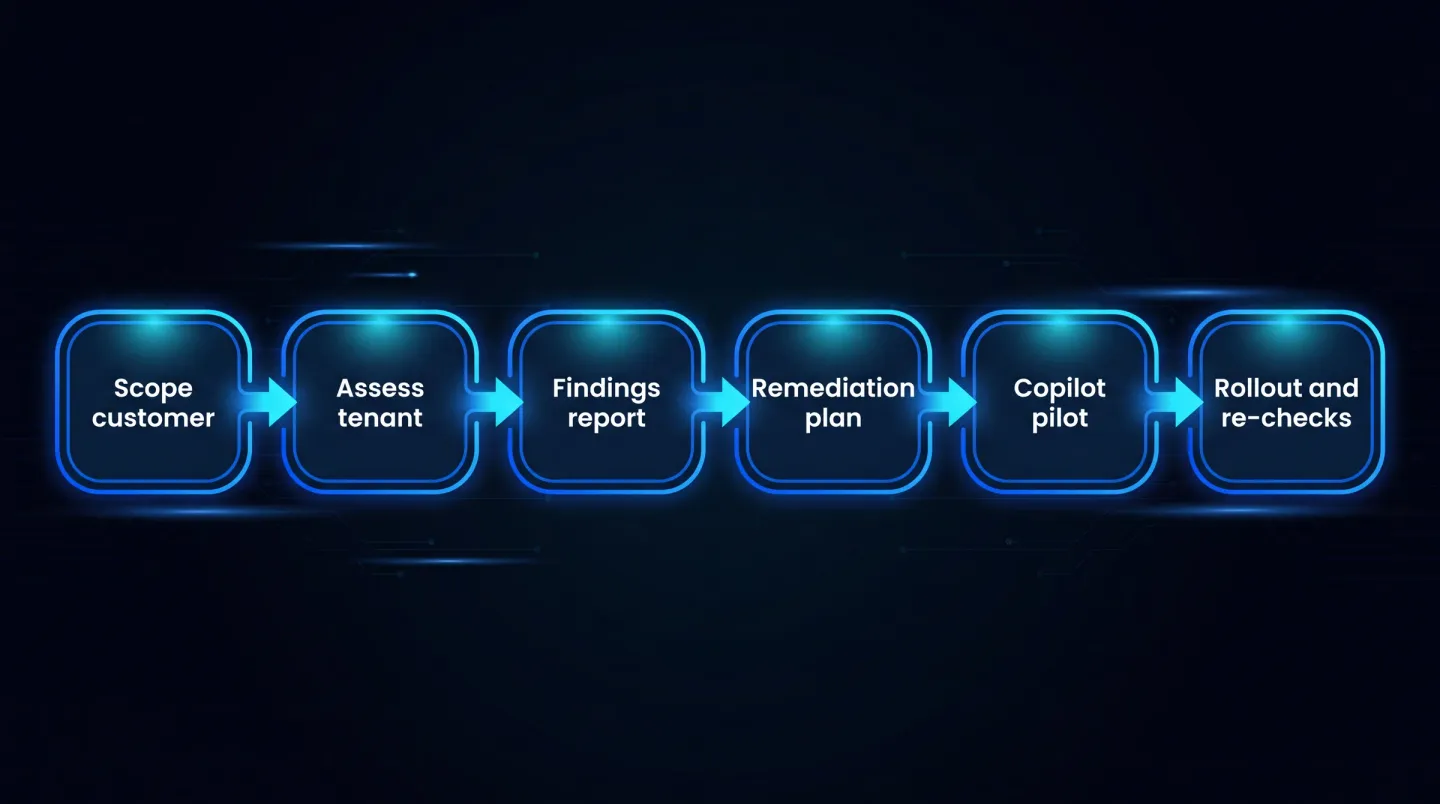
A repeatable Copilot readiness engagement MSPs can run per customer tenant.
Packaging and pricing the service
Keep the commercial model simple and let each stage sell the next. Deliver the assessment as a fixed-scope engagement so the customer knows exactly what they are buying and you can repeat it profitably. Deliver remediation as separate project work, priced against the action list the assessment produced, since its size depends entirely on the tenant. Fold the quarterly re-check into the managed-service agreement so readiness stays current without a fresh sales cycle each time. Exact numbers depend on your cost base and market, so set them against your own rate card rather than a fixed template.
Common blockers you will find in real tenants
The same few problems show up across almost every assessment.
Oversharing. Years of anyone-links, guest access, and broad site permissions mean the live sharing state rarely matches the written policy. This is the single most common reason a tenant is not ready, and it is worth a dedicated pass. The deep-dive in fixing oversharing across SharePoint, OneDrive, and Teams for Copilot covers the remediation in detail.
Unused licences funding the conversation. Dormant and unassigned seats are common, and reclaiming them often frees enough budget to justify the Copilot add-on without new spend.
Stale accounts. Leavers who kept access, service accounts with broad rights, and shared mailboxes with drifted permissions all widen what Copilot can reach. Clean offboarding is a readiness control, not just hygiene.
Update channels. Devices on an unsupported channel will not show Copilot features, so a pilot can look broken when the real issue is servicing configuration.
Frequently asked questions
What should a Copilot readiness assessment include? At minimum it should check licensing eligibility, data access and oversharing posture, sensitivity-label coverage, tenant hygiene such as dormant accounts and ownerless sites, and update-channel readiness, then produce a prioritised remediation plan with owners. The output is a go, not-yet, or fix-first verdict the customer can act on.
Which Microsoft 365 licences are eligible for Copilot? Copilot is a per-user add-on that requires an eligible base plan. The list is broad and includes several Microsoft 365 Business and Enterprise plans and a number of Office 365 plans, alongside a Microsoft Entra ID account and an Exchange Online primary mailbox. Because eligibility changes over time, confirm the current list in Microsoft's licensing guidance before you assign seats.
How do MSPs run readiness across many tenants? By standardising the method and the evidence shape so every tenant is a run of the same playbook, and by using multi-tenant reporting to keep the output consistent from one customer to the next. Consistency is what makes the service repeatable and the findings comparable at review time.
What remediation work usually follows? Tightening sharing and external access, applying and correcting sensitivity labels, offboarding stale accounts, reclaiming unused licences, aligning plans to real need, and moving pilot devices onto a supported update channel. Each is a scoped, billable piece of follow-on work.
Where EtherInsights fits
Running this across a handful of tenants by hand is manageable. Running it across a managed base, on a repeatable schedule, with a consistent evidence format, is where it becomes a platform job. EtherInsights gives MSPs multi-tenant assessment reporting with customer-level filtering, so each tenant's readiness evidence follows the same structure and is comparable across the book of business.
For the readiness work specifically, EtherInsights scores Microsoft 365 Copilot readiness across licensing, sensitivity labels, sharing, Purview coverage, and data governance, and pairs each finding with an owner and a proposed fix. It also holds the licence baseline evidence, so the same view that proves readiness also surfaces the unused seats that can fund the rollout, and the QBR-ready reports that carry the story into the customer review. You bring the service brand and the customer relationship, and the platform keeps the evidence consistent underneath.
Explore Microsoft 365 management for MSPs to see how per-customer reporting and licence evidence turn Copilot readiness into a repeatable service line.