
To prove a Microsoft 365 setting has not changed since your last audit, you need three things the platform does not keep for you: a dated snapshot of the configuration, a record of every change between snapshots, and a note of who authorised each one. The logs alone will not do it. Microsoft Entra keeps audit and sign-in data for 7 days on the Free tier and 30 days on P1 and P2. Microsoft Purview Audit (Standard) keeps most records for 180 days. Your certification cycle is 365. The gap between those numbers is the part of the year you cannot evidence from the platform alone.
That is not a criticism of the defaults. Retention is sized for operational investigation, where the useful window is days. Assurance asks a different question over a longer span, and closing the difference is your job.
What question does an assessor actually ask?
Most teams prepare for the wrong assessment. They screenshot the current state, confirm multi-factor authentication is enforced today, and produce a tidy pack showing a healthy tenant.
Then the assessor asks a question in a different shape. Not "is this policy on" but "has it been on since we last spoke, and if it was ever off, who turned it off and who agreed that was acceptable". You are audited on whether the configuration held for the whole period.
For most tenants nobody knows. Somebody may have added an exclusion in February and removed it in March, and by autumn nothing remembers. The change was legitimate. The absence of a record is the finding.
How long does Microsoft 365 keep security evidence?
Three retention windows matter, and they are not the same.
Microsoft Entra audit logs and sign-in logs. Seven days on Microsoft Entra ID Free, 30 days on P1 and P2. This is where directory changes live: conditional access policy edits, role assignments, application consent. Retention changes are not retroactive, so upgrading from Free to P1 gives you 30 days going forward, not 30 days of history.
Microsoft Purview Audit (Standard). 180 days by default, not 90. That changed on 17 October 2023, and much internal documentation still says 90. Records generated before that date keep the old 90 day period; later ones get 180 days. This is the unified audit log covering Exchange, SharePoint, OneDrive, Teams and more, a separate system from the Entra logs.
Microsoft Purview Audit (Premium). The default one year retention policy is narrower than the name suggests. It covers Microsoft Entra, Exchange, SharePoint and OneDrive records, and only for users holding an Office 365 or Microsoft 365 E5 licence, a Microsoft Purview Suite licence, or the E5 eDiscovery and Audit add-on. Non-E5 users and guests stay at 180 days, as does other workload activity unless a custom policy says otherwise.
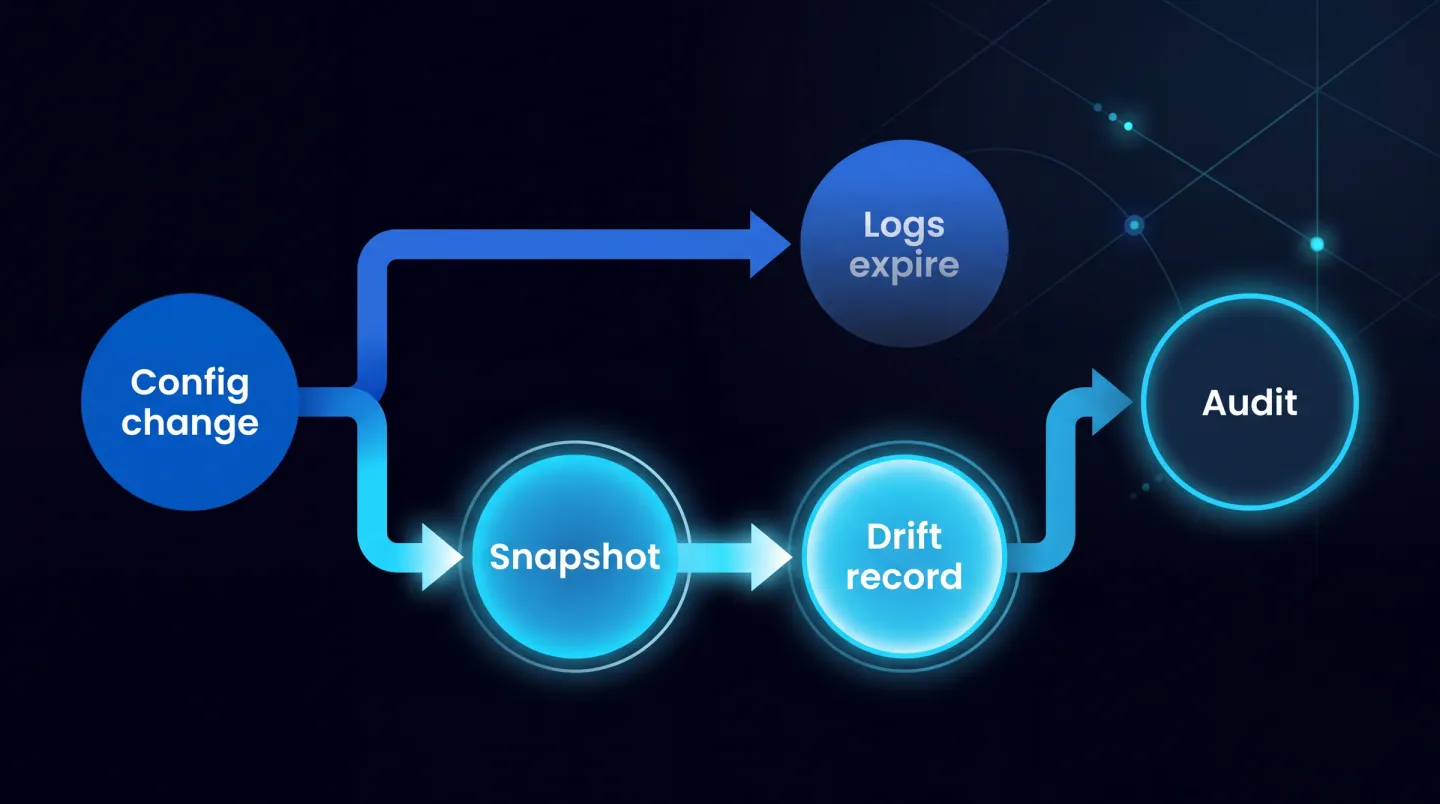
Platform logs expire on an operations schedule; assurance runs on a twelve month one.
The mismatch, worked through with real dates
Take a tenant certified on 14 October 2025 with the renewal booked for October 2026. On 12 October 2026 the assessor asks whether the policy requiring multi-factor authentication has been enforced continuously since the certificate was issued, and whether exclusions were added. Work backwards from that date on Entra ID P1:
- The Entra audit log answers back to 12 September 2026. Thirty days. It shows any policy edit in the past month and who made it.
- Purview Audit (Standard) answers back to around 15 April 2026. Six months, less than half the certificate year.
- Purview Audit (Premium), if you hold it, answers back to 12 October 2025 for Entra records, but only for users covered by an E5 class licence. On Business Premium or a mixed estate, that door is closed.
So on the tenant most organisations run, 14 October 2025 to mid April 2026 has no queryable platform record: six months of the certificate year in which the answer to "was this policy enforced" is a shrug.
One detail catches people who solve this late. In Purview the retention applied to a record is decided when it enters the pipeline, so a longer custom policy created in September does not extend records generated in March. Retention is decided in advance or not at all.
The mapping of Microsoft 365 settings to Cyber Essentials and ISO 27001 controls tells you which settings carry a control. This post is about proving they held.
Which three artefacts outlive the logs?
The configuration snapshot. A dated, machine-readable export of the settings carrying your controls. Not a screenshot: a screenshot proves what a page looked like, while a JSON export of a conditional access policy proves what it contained, exclusions included, and can be diffed against last month's copy. That export is the substance of a Microsoft 365 tenant backup: the settings themselves, dated and comparable, rather than the mailbox contents most backup products mean.
The drift record. The difference between consecutive snapshots. This turns a pile of exports into an argument: here is 1 March, here is 1 April, here are the four things that changed. Drift answers "has it changed", the assessor's real question.
The authorisation record. For each change in the drift record, who requested it, who approved it, and against what ticket or risk decision. Organisations almost never have this one, and it is what turns a finding into a clean answer.
These survive any log retention period, because you control where they live. Store them somewhere immutable or version-controlled with restricted write access, and hash them.
Building a baseline worth defending
A baseline needs to be complete enough to matter and small enough to run. Cover the settings your controls depend on: conditional access policies with their exclusions, the authentication methods policy, directory role assignments including eligible ones, cross-tenant access settings, device compliance profiles, tenant-wide sharing settings, and applications holding consented permissions. A first pass:
Connect-MgGraph -Scopes 'Policy.Read.All','Directory.Read.All','RoleManagement.Read.Directory'
$stamp = (Get-Date).ToString('yyyy-MM-dd')
$out = ".\baseline-$stamp"
New-Item -ItemType Directory -Path $out -Force | Out-Null
Get-MgIdentityConditionalAccessPolicy -All | ConvertTo-Json -Depth 12 | Set-Content "$out\conditional-access.json"
Get-MgPolicyAuthenticationMethodPolicy | ConvertTo-Json -Depth 12 | Set-Content "$out\auth-methods.json"
Get-MgDirectoryRole -All | ConvertTo-Json -Depth 8 | Set-Content "$out\directory-roles.json"
Get-ChildItem "$out\*.json" | Get-FileHash | Export-Csv "$out\hashes.csv" -NoTypeInformation
Two rules matter.
Run it on a schedule. An unscheduled baseline has gaps you cannot explain, and a gap looks worse than a change.
Set the cadence shorter than your shortest log retention. If the Entra audit log holds 30 days and you snapshot quarterly, then when a difference appears you cannot find out who made it, because the audit entry naming them expired weeks earlier. Snapshot weekly, or fortnightly at the very least, and every difference stays attributable while the log explaining it is alive.
Turning a drift record into evidence
A diff tells you what changed. An assessor wants to know who changed it and who agreed. Joining those is the whole exercise, and it has to happen inside the log window. For each changed object, pull the matching entry from the Entra audit log, which records the initiating actor:
$since = (Get-Date).AddDays(-30).ToString('yyyy-MM-ddTHH:mm:ssZ')
Get-MgAuditLogDirectoryAudit -Filter "activityDateTime ge $since and category eq 'Policy'" -All |
  Select-Object ActivityDateTime, ActivityDisplayName,
    @{n='Actor';e={$_.InitiatedBy.User.UserPrincipalName}},
    @{n='Target';e={$_.TargetResources[0].DisplayName}} |
  Export-Csv ".\policy-changes-$((Get-Date).ToString('yyyy-MM-dd')).csv" -NoTypeInformation
Then add what the platform cannot know: the change reference and the approver. One line per change is enough. Date, object, what changed, who changed it, ticket, approver. Appended to a register that never gets truncated, that line is still answering questions in three years.
Where a change has no ticket and no approver, record that too. An assessor is far more comfortable with "this was undocumented, here is what we did about it" than with a register containing no exceptions at all.
Drift and identity hygiene arrive together, so a leaver who kept an exclusion is a common find; the offboarding checklist covers that.
Where it breaks
Microsoft Entra ID Free. Seven days is not a window you can run a monthly process against. Fix this first, remembering the upgrade does not backfill.
Guests and non-E5 users. The Premium default stops at the licence boundary, so a mixed estate has a mixed retention position. Know which users are covered before relying on a year of history that exists for only some of them.
Exports nobody can query. A folder of PDFs is homework, not evidence. If answering "what changed in March" means opening files by hand, the process will be abandoned.
Delegated access at managed-service providers. When a partner makes the change, the actor in the customer's audit log is a partner identity while the approval lives in the partner's own system. Decide which side holds the authorisation record and how the customer obtains it, because at renewal the customer is being assessed. That belongs in the monthly reporting pack.
Assuming the renewal is the only deadline. Insurance questionnaires, customer security reviews and supplier assurance requests ask the same question.
Where EtherInsights fits
Running a weekly snapshot, diffing it and keeping an attributable register is easy to describe and tedious to sustain by hand. EtherInsights exists partly for that reason: it captures tenant configuration and identity state, tracks what moved between captures, and keeps the record queryable long after the platform's own logs have rolled off, so renewal evidence is a report you rerun rather than a fortnight of archaeology.
For partners the multiplication is the point, because the same question arrives from every customer within the same few weeks each autumn, and Microsoft 365 security and conformity is where posture and evidence sit together. Our Cyber Essentials v3.3 checklist covers what to fix; this covers how to prove it stayed fixed. ISO compliance and audit readiness picks up the wider evidence trail.
Explore Microsoft 365 security and conformity to see how baselines, drift, and the authorisation record come together before the next assessment.