
The Cyber Essentials question set changed on 27 April 2026. The Danzell version introduced something the scheme had not had before: questions where a wrong answer fails the assessment outright, rather than reducing a score. Several of them land squarely on Microsoft 365, and two of them catch things most tenants have quietly been carrying for years.
We hold Cyber Essentials ourselves, so this is written from going through it rather than from reading the specification.
This is a checklist to run before you submit, not a substitute for the official question set from IASME.
The change that catches people
Two things matter more than the rest.
Multi-factor authentication questions can now fail you outright. Previously an imperfect MFA position was something you explained. Now, for the accounts in scope, it is pass or fail.
There is a formal definition of cloud services in scope. This closes the gap that let organisations argue Microsoft 365 sat outside the assessment boundary. If your users sign into it and it holds organisational data, it is in scope. That argument is over.
Together they mean the assessment now reaches into places that used to be left alone.
That changes the nature of the work. An auto-fail question is not something you write a careful answer to; you can either answer it honestly in the affirmative or you cannot. The exercise becomes discovery rather than drafting: a list of every identity that can authenticate, what authenticates it, and what would break if you changed it. Producing that list is most of the effort. The remediation is usually quick.
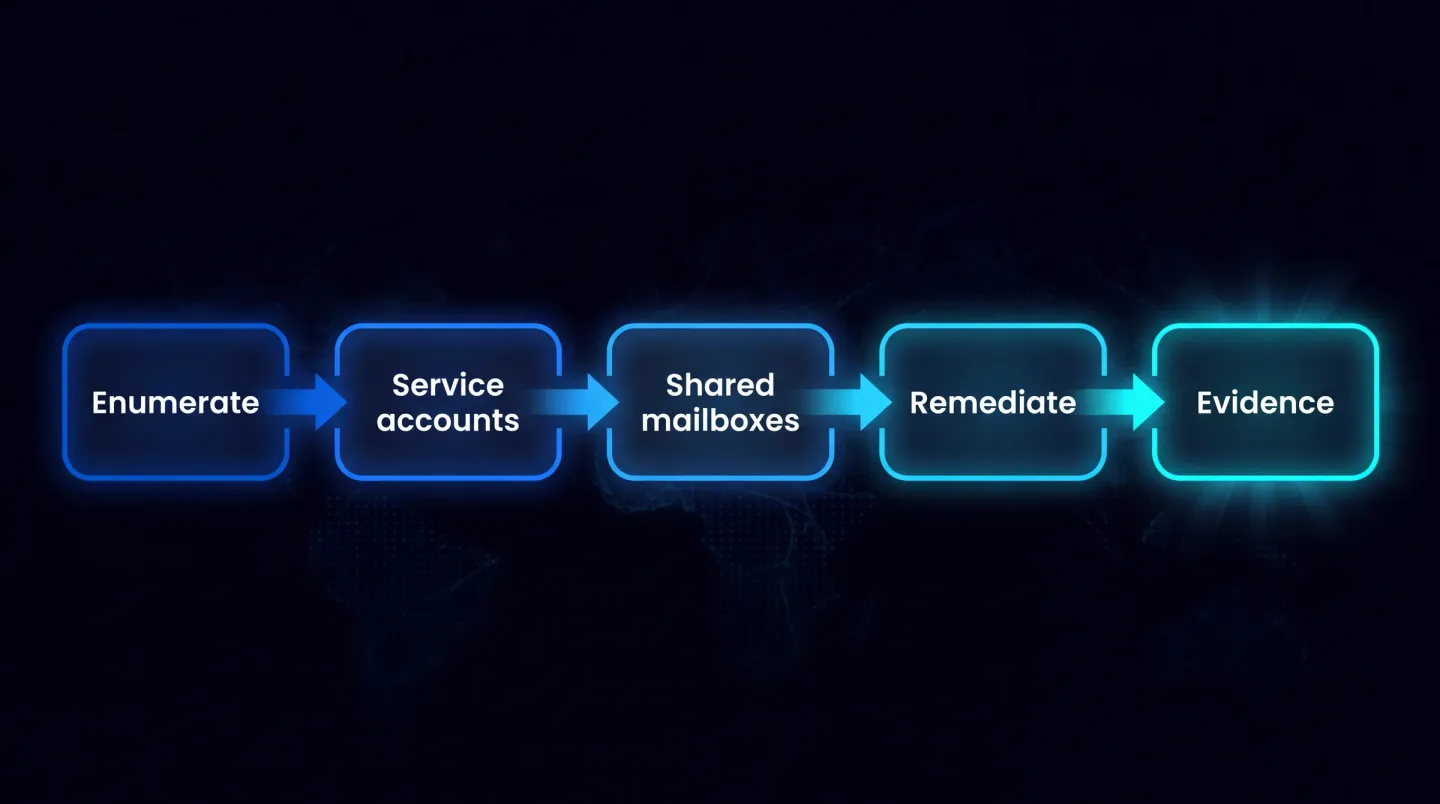
The order that keeps a Cyber Essentials pass repeatable: discover first, decide second, change third, and keep the evidence.
The two that actually catch people
Service accounts
Every tenant has them. The account that runs a scheduled export. The one a line-of-business application authenticates with. The one created for a migration in 2021 that nobody turned off.
They usually have no MFA, because MFA would break whatever they automate. That was tolerable when the question was scored. It is not now.
Find them before you argue about them. Two views give you the candidate list quickly:
- Microsoft Entra admin centre, Protection, Authentication methods, User registration details. Shows every account and whether it is MFA capable and registered. Filter to the accounts with nothing registered and you are looking at your exposure.
- Entra ID, Monitoring, Sign-in logs, filtered to non-interactive user sign-ins. Automation appears here, not in the interactive log. An account with thousands of non-interactive sign-ins and no registered method is a service account, whatever anyone called it.
The same list comes out of Microsoft Graph PowerShell as a CSV:
Connect-MgGraph -Scopes 'AuditLog.Read.All','Directory.Read.All'
Get-MgReportAuthenticationMethodUserRegistrationDetail -All |
  Where-Object { -not $_.IsMfaRegistered } |
  Select-Object UserPrincipalName, IsAdmin, IsMfaCapable |
  Export-Csv .\no-mfa.csv -NoTypeInformation
What to do, in order of preference:
- Replace the account entirely. A workload identity or managed identity is the correct answer for anything running unattended. No interactive sign-in, no MFA question, no shared secret in a config file.
- If it must stay an account, remove interactive sign-in rights, scope it tightly with conditional access, and be able to show what it can and cannot do.
- Document why it exists. An assessor will accept a controlled exception far more readily than an account nobody can explain.
A worked example: a finance export runs nightly under a licensed account with a password in a scheduled task. The right answer moves it to an app registration with certificate credentials and only the Graph permissions the export needs, removing the account and the password together. If the application cannot do that yet, keep the account, block interactive sign-in, restrict it by conditional access to that one service, and record the compensating control.
The failure mode here is discovering these the week you submit. They are always more numerous than expected.
Shared mailboxes
This is the one that surprises people. A shared mailbox is not supposed to have an enabled sign-in at all. Access is meant to be delegated to named users who have their own MFA.
In practice many tenants have shared mailboxes with an enabled underlying account and a password somebody knows, created years ago so a phone or a scanner could send mail. That is an account with a password and no MFA, holding organisational data, and the new question set has an opinion about it.
Check every shared mailbox for an enabled sign-in:
Connect-ExchangeOnline
Connect-MgGraph -Scopes 'User.Read.All'
Get-Mailbox -RecipientTypeDetails SharedMailbox -ResultSize Unlimited |
  ForEach-Object { Get-MgUser -UserId $_.ExternalDirectoryObjectId -Property UserPrincipalName,AccountEnabled } |
  Where-Object { $_.AccountEnabled } |
  Select-Object UserPrincipalName
Anything that comes back needs sign-in blocked, in the Entra admin centre under Users or with Update-MgUser -UserId <upn> -AccountEnabled:$false. Delegate access with Add-MailboxPermission for full access and Add-RecipientPermission for send-as, so every action against that mailbox belongs to an identity carrying its own MFA.
If something genuinely needs to send mail unattended, that is an application permission problem, not a mailbox password problem. Move it to an app registration with tightly scoped mail permissions, or to a receive connector restricted to a known static address. Where basic SMTP authentication is still enabled, Set-CASMailbox -Identity <mailbox> -SmtpClientAuthenticationDisabled $true closes it per mailbox and the equivalent setting on Set-TransportConfig closes it organisation-wide. Check what each device supports first: a multifunction device that silently stops scanning to email is a support queue nobody thanks you for.
The rest of the checklist
Every user account with a licence has MFA. Not "we have a policy". Verify enforcement, including accounts created since the policy was written, guests, and anyone excluded from conditional access. Read the exclusions on each policy specifically, because that is where the drift lives: a project group added for a fortnight in 2024, a vendor account, a directory role that quietly bypasses the rule.
Guest accounts are accounted for. Guests authenticate in their home tenant, so their MFA may be satisfied elsewhere, and cross-tenant access settings decide whether your tenant trusts that claim. You do not have to make a particular choice, but you must know which one you made.
Break-glass accounts are a documented exception. You are allowed emergency access accounts. You are expected to control and monitor them: two cloud-only accounts, excluded from the policies that could lock everyone out, credentials split and held physically, and an alert that fires the moment either one signs in. Current guidance favours a phishing-resistant method rather than a password alone, so review that if the pair are some years old.
Administrative accounts are separate from daily-driver accounts. An admin who browses email from the same identity is a finding waiting to happen. Where the licensing supports it, just-in-time elevation through Privileged Identity Management gives you the separation and a ready-made record of who held which role and when.
Legacy authentication is off. If basic authentication can still reach anything, the MFA answer is not true in practice. Filter the sign-in logs on a client app of "Other clients" and see what appears. Most legacy protocols in Exchange Online are long retired; SMTP authentication is the one that survives, because something operational depends on it.
Your device patching evidence is exportable. The scheme cares about the state of devices, and the answer needs to come from something you can show rather than assert. Intune can produce it, and proving that from Intune is a separate exercise worth doing before you need it. What you want is a dated export of build and update compliance per device, not a screenshot of a dashboard that will look different next week.
Your scope statement matches reality. With cloud services formally defined, an inaccurate boundary is now a straightforward fail rather than a discussion. Walk the list of services your people sign into with a work identity, including the ones a department adopted without telling anyone.
Do this in the right order
Run the discovery before you touch anything. The temptation is to start blocking sign-ins as you find them, which is how a scheduled invoice run stops silently on a Friday afternoon.
The order that works:
- Enumerate every account: users, service accounts, shared mailboxes, guests.
- For each, establish what it is for and whether anything depends on it.
- Decide the target state for each one.
- Change them in a controlled way, watching for what breaks.
- Capture the evidence as you go, because you will need it again next year.
Give yourself about six weeks. Chasing down what a mystery account is used for takes the longest, and report-only conditional access policies let you measure a tightening before it lands on anyone.
Keep the evidence as a dated export per control rather than a folder of screenshots: the registration details report, the conditional access policies with exclusions visible, the shared mailbox sign-in state, the break-glass procedure, the device compliance export, and a note per exception. A scheduled tenant configuration backup gathers most of that continuously, so next year's exports already exist rather than being rebuilt the week before you submit.
Cyber Essentials renews annually, so anything you build as a one-off you will rebuild in twelve months. Building it as something repeatable is the difference between a fortnight and an afternoon next time.
Where this connects
The evidence problem and the security problem are the same problem viewed from two sides. Our Microsoft 365 security and conformity route covers posture, and ISO compliance and audit readiness covers the evidence trail. We wrote about mapping Microsoft 365 settings to Cyber Essentials and ISO 27001 previously, and that mapping still holds; what changed is the consequence of getting it wrong.
The account hygiene overlaps almost completely with joiner, mover and leaver work, so running the Microsoft 365 offboarding checklist properly does a share of this for you.
Where EtherInsights fits
Gathering this evidence by hand, annually, across a tenant is exactly the kind of work that gets deferred until it is urgent. EtherInsights exists partly for that reason. It reports on identity and MFA coverage, device and Intune state, and tenant configuration from one place, so the discovery pass becomes a report you can rerun next year and compare against this one.
For managed-service providers the multiplication is the point: the same checklist across twenty tenants is twenty discovery exercises, and the accounts that fail in one tend to look identical in the next. Running it as a repeatable report is what makes annual renewal survivable, and Microsoft 365 security and conformity is where posture and evidence sit together.
Explore Microsoft 365 security and conformity to see how posture, evidence, and annual reassessment come together in one place.