
Microsoft 365 Copilot grounds its answers in the content the signed-in user already has permission to open. It does not break permissions or hand out new access. It reasons only over the files, mail, and chats that person could already reach, which means it inherits the exact access model you have today. That is precisely why oversharing becomes visible the moment you switch it on. Content that was protected only by obscurity, a document nobody realised was shared with the whole organisation, becomes discoverable through a single natural-language prompt. Finding and fixing oversharing across SharePoint, OneDrive, and Teams before you enable Copilot is therefore a readiness task, not an optional cleanup you can defer.
For an IT administrator or security lead preparing a rollout, and for managed-service operators doing this across customer tenants, the worry is the same: permission sprawl that built up quietly over years can surface overnight. The platform that makes it visible also gives you the tools to find and remediate it first.
Why Copilot makes oversharing visible
Copilot's data access is always scoped to the signed-in user's permissions. Microsoft's architecture documentation is explicit that it presents only data each individual can already access, and that the grounding index honours the identity-based access boundary, so it never reaches content the user could not open themselves. OneDrive follows the same rule: because OneDrive runs on SharePoint Online underneath, your tenant-level SharePoint sharing policies apply to it too, and Copilot only surfaces OneDrive files within the user's existing permissions.
So Copilot does not create a new risk; it changes the speed of discovery. Overshared content used to stay practically hidden, because finding it meant knowing where to look and clicking through site after site. Copilot collapses that friction: a prompt such as "summarise our current restructuring plans" will pull from any accessible document that matches, including one shared far more widely than anyone intended. The permission was always too broad; Copilot just makes it easy to notice.
Where oversharing comes from
Oversharing rarely comes from a single mistake. It accumulates from ordinary collaboration, and a handful of patterns account for most of it.
- Permissive sharing-link defaults. SharePoint's sharing settings ship permissive so collaboration works out of the box. Left unreviewed, "Anyone" links that need no sign-in and "People in your organization" links spread access well beyond the original recipients.
- The "Everyone except external users" claim. EEEU is a built-in group that automatically includes every internal user. When a site is set to public, or a file is shared directly with EEEU, its content becomes visible to the entire organisation.
- Organisation-wide teams. An org-wide team in Microsoft Teams automatically includes every user and keeps that membership current as people join and leave. Each team is backed by a SharePoint site, so anything stored there is reachable by everyone.
- Ownerless and inactive sites. Sites whose owners have moved on, or that nobody has touched in months, drift out of review while their permissions stay live.
- Broken permission inheritance. Once a library, folder, or file is given its own permissions, it no longer follows the site, and those exceptions are where unexpected access hides.
How to find it
Discovery is where SharePoint Advanced Management (SAM) earns its place. SAM is included once at least one Microsoft 365 Copilot licence is assigned in the tenant, so the reporting you need for readiness comes with the rollout itself.
Start in the SharePoint admin center. The data access governance reports are built to find these patterns: a permission state snapshot shows how broadly sites and OneDrive accounts are exposed, sharing-link activity reports highlight where the most "Anyone" and organisation-wide links are created, the EEEU insights report finds content shared with everyone, and a sensitivity-label snapshot shows where labels are and are not applied. The Content Management Assessment pulls these signals together to flag sites with oversized audiences, EEEU usage, broken inheritance, and inactive or ownerless status.
Because compliance rules mean IT administrators cannot see file-level detail, the fastest way to act on those reports is to initiate site access reviews. This hands the review of an overshared site to the people who know its content, the site owners, who remove excess access themselves. You can start reviews for up to 100 sites from a report, and use PowerShell for larger batches. To weigh sharing against sensitivity, Microsoft Purview Data Security Posture Management data risk assessments flag overshared sites that also hold sensitive data, where your highest-priority risk lives.
If a rollout date is close and you need breathing room, Restricted SharePoint Search is the interim control. It restricts organisation-wide search and Copilot to an allowed list of sites you have already checked, while you remediate the rest. Treat it as temporary: Microsoft is clear it is not a security boundary and does not change permissions, and users can still reach content they own or have recently opened. Turn it off once the underlying permissions are fixed. For the wider set of readiness signals to gather alongside oversharing, the Microsoft 365 Copilot readiness assessment checklist covers licensing, governance, and adoption in the same pass.
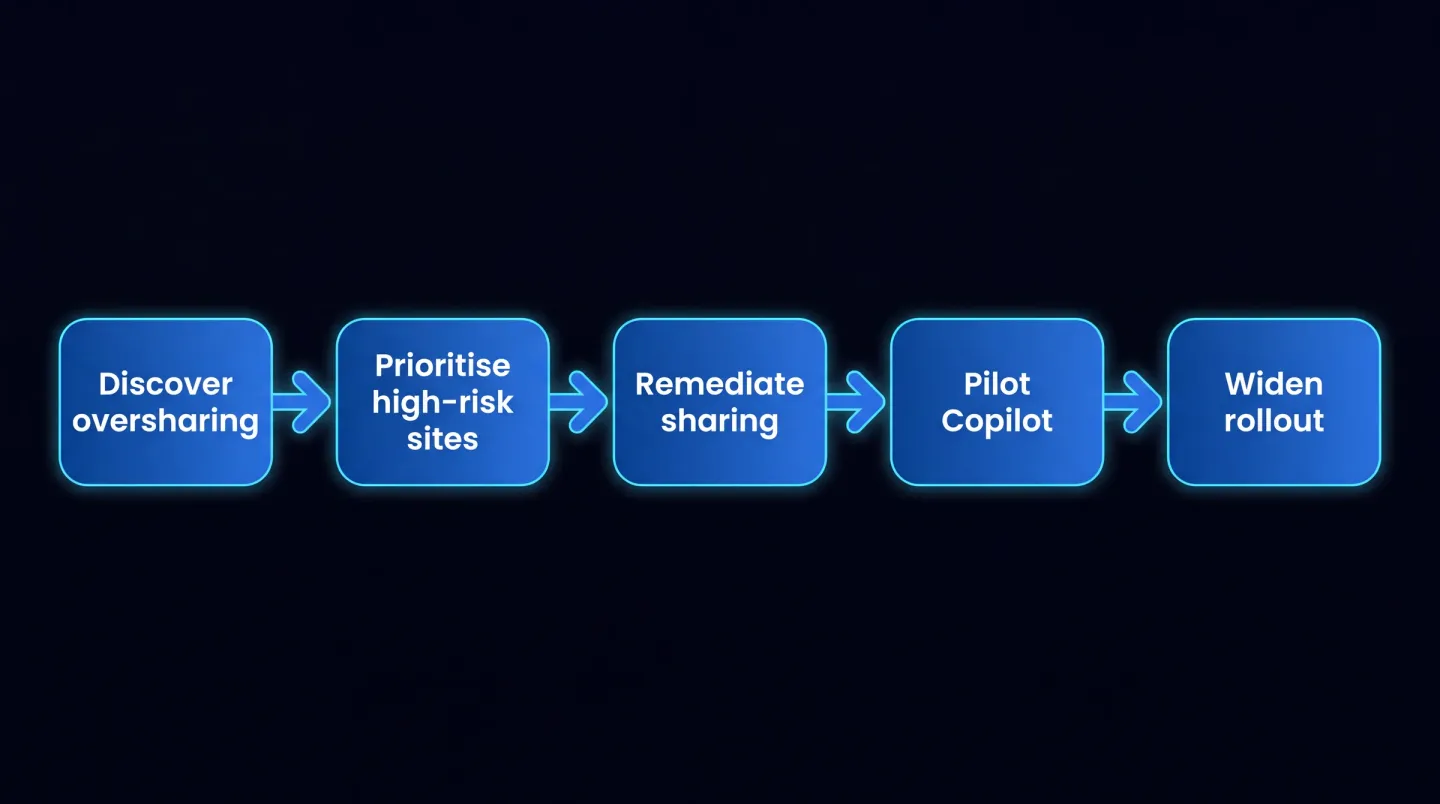
From oversharing discovery to a controlled Copilot rollout.
How to fix it
Remediation works best in priority order, cutting exposure fast and then closing gaps for good.
- Tighten sharing-link policies. In the SharePoint admin center under Policies then Sharing, set a more conservative default link type such as "Specific people" or "Only people in your organization," and add an expiry to any "Anyone" links. A site can be locked down further than the organisation default but never made more permissive, so the tenant setting is your safety floor.
- Run site-level reviews with owners. Use site access reviews so owners rescope sharing links, remove the EEEU claim from groups and items, and correct broken inheritance. Where a site holds sensitive content, Restricted Access Control can limit it to a named security group so only those members, and their Copilot, can reach it.
- Classify and protect with Purview. Apply sensitivity labels to your most sensitive sites and content. Copilot honours label protection, so a labelled and encrypted file is respected in its answers, and data loss prevention for Copilot can hold sensitive content out of grounding entirely while you work.
- Restrict organisation-wide sharing. Reduce EEEU usage at scale, and review whether every org-wide team still needs to include everyone. These broad grants are the ones a single prompt exposes most readily.
- Clean up stale sites. Use site lifecycle management, ownership policies, and inactive-site policies to find ownerless and dormant sites, then archive or delete what is no longer needed so Copilot is not grounding on abandoned content.
The same evidence you produce here doubles as conformity proof. If you already map Microsoft 365 controls to a framework, the approach in mapping Microsoft 365 to Cyber Essentials and ISO 27001 shows how access and sharing controls fit an audit story rather than living only in a rollout ticket.
A phased pre-Copilot rollout
Sequence beats scramble, and Microsoft's own secure-foundation guidance follows the same shape.
- Assess. Baseline the tenant with the reports above so you know where the widest exposure is before changing anything.
- Remediate the top-risk sites first. Concentrate on sites that combine sensitive content with broad access, applying interim controls while owners fix permissions.
- Pilot with a controlled group. Enable Copilot for a scoped cohort whose content you have already reviewed, and confirm through auditing that it surfaces nothing it should not.
- Widen deliberately. Expand once each wave's sites are remediated, so exposure never runs ahead of the cleanup.
Where EtherInsights fits
Working this across a growing estate, or across many tenants as a managed-service provider, is where scattered reports become a job in itself. EtherInsights Copilot readiness brings the signals into one operating view: it scores readiness across licences, data governance, sensitivity labels, sharing posture, and Purview coverage against the real tenant state, and turns each finding into an owner-backed action with evidence for the rollout review. Because the report shape stays the same across tenants, an MSP can run the identical readiness pass at customer scale.
Oversharing is only one part of the wider posture picture. Microsoft 365 security and conformity extends the same tenant view into security baselines, Secure Score tracking, and drift detection, so a configuration you assessed before Copilot does not quietly change afterwards. Both routes are led by EtherInsights, which keeps the assessment factual: it reports tenant state to inform decisions, not to promise a rollout is risk-free.
Frequently asked questions
Does Copilot bypass permissions? No. Microsoft 365 Copilot only accesses data the signed-in user is already authorised to open, using the same access controls as the rest of Microsoft 365. It cannot reach content the user has no permission to see. It does not bypass permissions; it makes existing oversharing easier to discover, which is why you fix that first.
What is Restricted SharePoint Search? It is a temporary control that limits organisation-wide search and Copilot to an allowed list of SharePoint sites you have already checked. It buys time during a phased rollout, but Microsoft is clear it is not a security boundary and does not change permissions, so treat it as a bridge to proper remediation, not a substitute.
Do I need SharePoint Advanced Management? The oversharing reports, site access reviews, and restricted-content controls described here are SAM capabilities, and SAM is included once at least one Microsoft 365 Copilot licence is assigned in the tenant. So if you are licensing Copilot, the discovery tooling comes with it.
How long does oversharing cleanup take? It depends entirely on estate size and how much access has accumulated, so treat any single figure with caution. In practice discovery is quick; the time cost sits in remediation, especially owner reviews on high-risk sites. Scoping the pilot to already-clean sites lets you start safely while the wider cleanup continues.
Readiness is not a blocker to Copilot; it is what makes the licences you buy safe to switch on. Find the oversharing, fix it in priority order, and pilot from evidence.
Explore Microsoft 365 Copilot readiness to see how scattered tenant signals become a scored, owner-backed plan you can roll out with confidence.