
Azure reservations and Azure savings plans are both commitment discounts: you agree to one or three years of usage in return for lower rates than pay as you go. The core difference is what you commit to. An Azure reservation commits you to a specific virtual machine size family in a specific region, which buys the deepest discount but the least flexibility. An Azure savings plan for compute commits you to an amount of spend per hour that applies automatically across regions and compute families, trading a little discount depth for a lot of flexibility. Reservations suit steady, well-known workloads that will not move; savings plans suit workloads whose shape keeps shifting. Whichever you choose, right-size first, because a commitment discount only lowers the rate, not the waste underneath it.
That is the short answer. The rest of this guide covers how each option works, the trade-off between them, how they stack with Azure Hybrid Benefit, and the one mistake that wastes more than either can save.
How Azure reservations work
An Azure reservation, sometimes called a reserved instance, commits you to a specific configuration for a one-year or three-year term. For virtual machines you commit to a size family in a region, for example a D-series machine in UK South, and get a discounted rate on the matching usage in return. Reservations are a billing construct: they change the price you pay, not the way the resource runs. Three mechanics matter when you buy one.
Scope. A reservation can apply at a single subscription, a single resource group, a shared scope across all subscriptions in the billing context, or a management group. Shared scope is the most forgiving, because the discount looks for any matching resource across the estate rather than sitting idle if one subscription stops using it.
Instance size flexibility. A virtual machine reservation optimised for instance size flexibility applies across the sizes in the same flexibility group, not just the exact size you bought. Azure uses a ratio per size to work out how far the reservation stretches, so one bought for a larger size can cover several smaller ones in the same group. It does not cross into a different family, so a reservation for one series will not discount another.
Exchange and refund. Microsoft has revised the exchange rules more than once, so confirm the current policy before you rely on it. As of mid-2026, Microsoft has set a firm cut-off: series and region exchanges for virtual machine, dedicated host, and App Service reservations purchased before 1 February 2027 keep the right to one final exchange after that date; reservations purchased from 1 February 2027 onward cannot be exchanged at all. Trading a reservation in for a savings plan is unaffected, as is instance size flexibility for virtual machines. Refunds are possible, but the total commitment you can cancel is capped within a rolling twelve-month window per billing scope, so a refund is a safety valve, not an easy exit. Treat a reservation as a genuine commitment and check the live policy at purchase.
How Azure savings plans for compute work
An Azure savings plan for compute takes a different approach. Instead of committing to a size and region, you commit to a fixed amount of spend per hour for one or three years. Each hour, Azure applies the benefit to eligible compute usage, starting with whatever carries the highest discount, until the hourly commitment is used up. Anything above the commitment that hour is billed at pay-as-you-go rates.
The benefit is broad. A compute savings plan applies to infrastructure costs across many services, including virtual machines, App Service, Container Instances, Container Apps, the Functions premium plan, dedicated hosts, and Azure Spring Apps for Enterprise, across regions automatically. The appeal is that you do not have to predict which family or region a workload will land in; the savings plan follows the spend.
Two caveats matter. The hourly benefit is use-it-or-lose-it, so an hour where you run below your commitment leaves that portion unrecoverable, it does not roll into the next hour. And a savings plan cannot be cancelled or refunded once purchased, so sizing the hourly commitment matters more than with a reservation. Size it against a look-back on real usage, which is what the Azure Advisor and portal recommendations are built from.
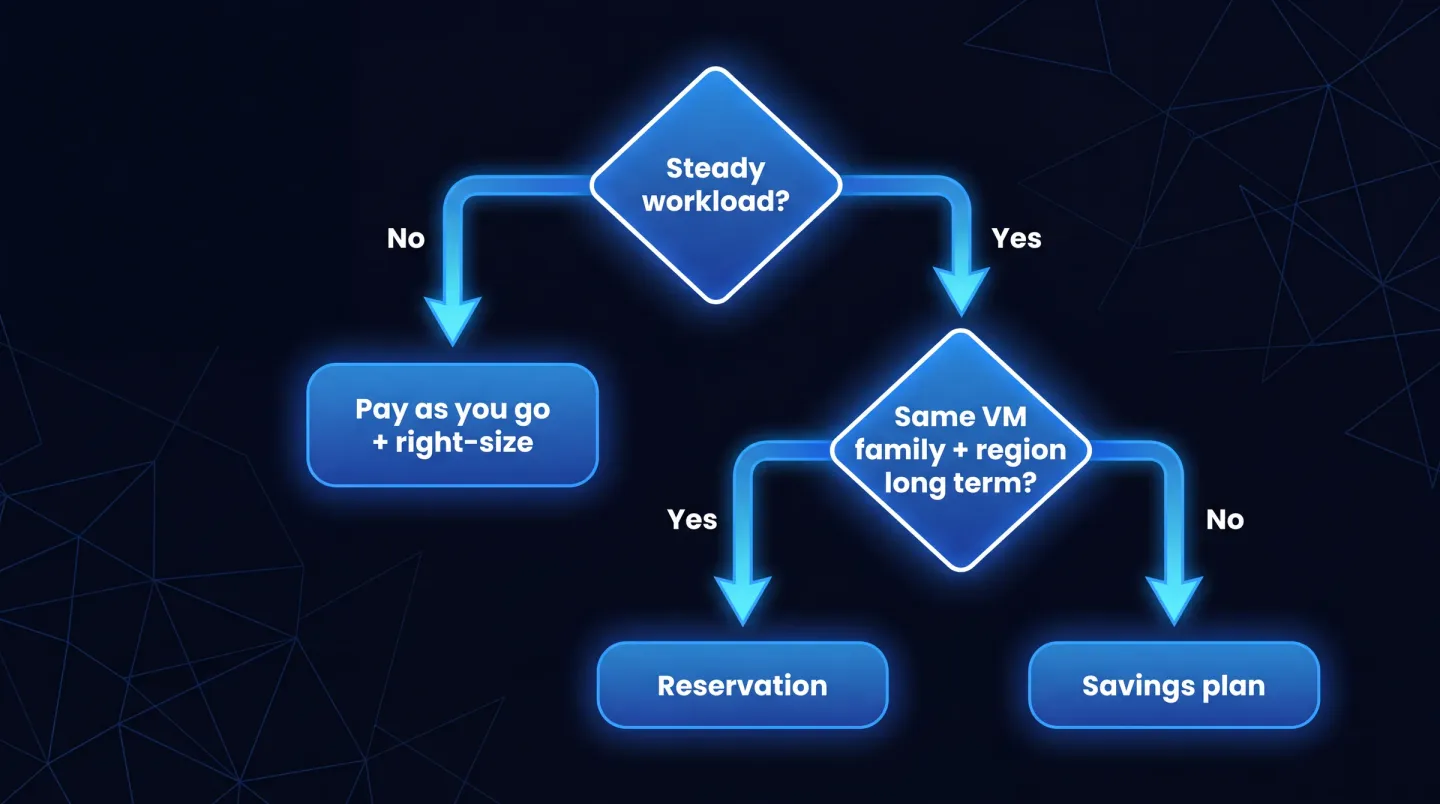
A quick way to decide: right-size first, reserve what is stable and fixed, and use a savings plan for everything that still moves.
Discount depth versus flexibility
Choosing between the two is a trade-off between depth and flexibility. A fully utilised reservation delivers the deepest discount available, because you have handed Microsoft the most certainty: a known size, a known region, for a known term. A savings plan gives up a little of that depth to apply itself automatically wherever your eligible compute runs.
The hidden variable is utilisation. A reservation only pays off if the matching resource keeps running, so buy one for a machine you later resize, move, or switch off and the deep discount evaporates into an unused commitment. A savings plan is harder to strand, because it chases spend rather than waiting for one specific machine. The honest comparison is not headline rate against headline rate; it is the deeper reservation rate multiplied by how confident you are that the workload will sit still.
When each one fits
Choose a reservation when a workload runs continuously and predictably with no expected change to its size, family, or region. Domain controllers, an always-on line-of-business database, a steady application tier that has held its shape for a year: these are reservation territory, and where the deepest Azure commitment discounts land.
Choose a savings plan when workloads are dynamic or evolving, use a mix of families or compute services, or are shifting between regions. If you cannot say where the spend will be in six months, the savings plan absorbs that uncertainty in a way a reservation cannot.
Most estates are not all one or the other. A common pattern is a base layer of reservations over the stable core, with a savings plan covering the variable layer on top: the reservations extract maximum depth from the parts that never move, and the savings plan mops up the rest.
Combining with Azure Hybrid Benefit
Neither a reservation nor a savings plan for compute covers software licensing; both discount the infrastructure. That is where Azure Hybrid Benefit comes in. If you already hold Windows Server or SQL Server licences with active Software Assurance, or qualifying subscription licences, it lets you apply them to Azure workloads and remove the equivalent licensing charge from the bill.
The important point is that these stack. A reservation or savings plan lowers the compute rate; Hybrid Benefit removes the Windows or SQL licensing cost on the same resource. Used together they compound, so the fully optimised position on a steady Windows or SQL workload is usually a reservation plus Azure Hybrid Benefit.
The classic mistake: committing before you right-size
The most expensive error is committing before the estate is right-sized. A commitment discount reduces the rate you pay, not the amount of resource you pay for. Lock a three-year reservation onto a virtual machine twice the size it needs to be, and you have not saved money, you have signed a longer contract on waste.
Microsoft's own recommended sequence puts this in order: right-size and remove oversized or idle resources first, reassign or exchange underused reservations, trade rigid reservations toward flexible savings plans where usage has become variable, then buy new reservations for the stable baseline, and finally add savings plans sized to that optimised estate. Discounts come last. Get the shape right, then buy the discount that fits it.
This is why Azure VM right-sizing belongs before any commitment decision: sizing each machine to its observed utilisation first means the reservation or savings plan you buy is priced against real need, not a peak that never comes back.
What to do at renewal
Commitments end, and renewal is a decision, not a formality. Reservations can renew automatically, but a renewal is priced at the rate available when it renews, not the rate you originally locked in, so it is not a guarantee of the same deal. Before any term rolls over, re-check utilisation, because a reservation that fitted the estate a year ago may now point at a machine that has been resized or retired.
Treat renewal as a chance to re-optimise: turn off auto-renew where the workload has changed, right-size again, and reconsider the reservation-versus-savings-plan question with fresh usage data. A workload that has drifted from fixed to variable is a candidate to trade toward a savings plan rather than re-commit to a shape it has outgrown.
Where EtherInsights fits
Deciding between Azure reservations vs savings plans is straightforward for one workload and hard across a whole estate, or across many customer tenants for a managed-service provider. The commitment only pays off when it is sized against a right-sized baseline, and that baseline is what tends to be missing. EtherInsights is built to close that gap: it surfaces oversized and idle Azure resources so you right-size before you commit, then tracks the before-and-after so the decision rests on evidence rather than a hunch.
On the compute side, Azure VM right-sizing turns utilisation into owner-backed resizing actions, the step that should always come before a reservation or savings plan purchase. Because commitment discounts are only one lever, it is worth reading the wider view in our guide to reducing Microsoft 365 and Azure costs, which sets commitments alongside the licence and idle-resource waste beside them, and seeing what EtherInsights reports across the estate.
Reservations and savings plans are two tools for two workload shapes: right-size first, reserve what is fixed, cover the rest with a savings plan, add Azure Hybrid Benefit where the licences exist, and revisit the mix at every renewal.
Explore cloud cost optimisation to right-size your estate first, then buy the Azure commitment discount that actually fits it.