
Choosing between Microsoft 365 Business Premium, E3 and E5 comes down to a question asked per cohort rather than per organisation: what does this group of users genuinely need? Business Premium is the strong fit for smaller organisations of up to 300 users that want productivity and integrated security in one plan. Microsoft 365 E3 suits larger estates, and those that need enterprise identity and management at scale, because it removes the 300-seat ceiling. E5 is for the users who genuinely need advanced security, compliance, voice and analytics on top of E3. Task-based and frontline roles are frequently better served by Microsoft 365 F3. In practice the best-value answer is rarely one plan for everyone. It is a deliberate mix of plans in a single tenant, matched to real need and reviewed as people join, move and leave.
Start with the 300-seat line
The first fact that shapes any Microsoft 365 plan comparison is a hard boundary. Microsoft 365 Business Premium belongs to the Business family of plans, alongside Business Basic and Business Standard, and that family is designed for organisations with up to 300 users. Microsoft applies a tenant limit of 300 provisioned licences in total across the whole Business family, so a tenant with 250 Business Premium seats can add only another 50 seats of any Business plan before the ceiling is reached.
For most small and medium-sized organisations that is plenty of headroom, and Business Premium is a natural home. Once an organisation grows past 300 users, or expects to, the enterprise plans, Microsoft 365 E3 and E5, become the relevant options because they carry no per-tenant user cap. Knowing where you sit against that 300-seat line is the quickest way to narrow the choice before you look at any features at all.
UK list pricing, at a glance
List pricing changes, so treat this as a snapshot rather than a quote, but the relative gaps are the useful part. All prices are per user/month, annual commitment, UK GBP, excluding VAT, taken from Microsoft's published pricing pages in August 2026:
| Plan | UK price (ex VAT) | Copilot included? |
|---|---|---|
| Microsoft 365 Business Basic | £5.40 | No |
| Microsoft 365 Apps for business | £9.80 | No |
| Microsoft 365 Business Standard | £18.10 | Yes (bundled) |
| Microsoft 365 Business Premium | £24.60 | Yes (bundled) |
| Microsoft 365 E3 | £33.50 | No (add-on, £23.10) |
| Microsoft 365 E5 | £51.60 | No (add-on, £23.10) |
The number worth pausing on is the Copilot column. Microsoft now bundles Copilot into Business Premium's list price, so a Business Premium seat at £24.60 already includes it. E3 does not include Copilot at all — adding it brings an E3 seat to roughly £56.60, more than double Business Premium's all-in price. That does not make E3 the wrong choice once an organisation is past the 300-seat line or needs the enterprise identity and device-management stack E3 carries, but it does mean "we need Copilot" is not, on its own, a reason to move a sub-300-seat organisation off Business Premium. E3 and E5 are both listed as "annual commitment, contact sales" rather than self-serve checkout, so the numbers above are Microsoft's published list price, not a negotiated Enterprise Agreement or CSP rate, which is usually lower at volume — confirm your own tenant's actual contracted price before using list price for a business case.
What Business Premium already covers
It helps to be clear about how capable Business Premium already is, because the plan is easy to underestimate. Business Premium includes everything in Business Standard, which covers the familiar productivity apps along with Exchange, SharePoint, OneDrive and Teams, and it adds an integrated security layer built for smaller organisations: Microsoft Defender for Business, Microsoft Defender for Office 365 Plan 1, and the full capabilities of Microsoft Intune for device management.
Microsoft Intune reporting helps show whether Business Premium device management is actually landing across apps, updates, compliance, and enrolment.
For a great many SMBs that combination meets the real security and management need without moving to an enterprise plan. So the honest starting position in a Business Premium vs E3 conversation is not "which plan has more". It is "does this organisation need something Business Premium cannot provide, or is it about to outgrow the Business family?"
What E3 adds over Business Premium
Microsoft describes Microsoft 365 E3 as combining productivity apps with core security and compliance capabilities, and it is built for scale. The clearest reasons to choose E3 over Business Premium are structural rather than a simple feature count. E3 removes the 300-seat ceiling, brings enterprise identity through Microsoft Entra ID P1, includes Enterprise Mobility + Security E3 and Microsoft Defender for Endpoint Plan 1, and carries Windows 11 Enterprise along with the enterprise information-protection and compliance baseline that larger organisations rely on. Since 1 July 2026, E3 also includes Microsoft Defender for Office 365 Plan 1, Intune Plan 2 capabilities (Tunnel for mobile application management, specialty device management, firmware-over-the-air updates), Intune Remote Help, and Intune Advanced Analytics — capabilities that previously sat behind separate add-on purchases.
There is genuine overlap between Business Premium and E3, and in some security areas Business Premium is deliberately generous for its market. The decision to move to E3 is usually driven by size, by a need for enterprise-grade identity and endpoint management, or by compliance obligations that suit the enterprise tooling, rather than by any single missing feature.
What E5 adds over E3
Microsoft 365 E5 is E3 plus a set of advanced capability clusters. Microsoft summarises it as advanced security, compliance, voice and analytics, and that is the useful way to frame the Microsoft 365 E3 vs E5 decision. On security, E5 steps up to Microsoft Defender for Endpoint Plan 2, Defender for Office 365 Plan 2, extended detection and response, and Microsoft Entra ID P2 with capabilities such as Privileged Identity Management and Identity Protection. On compliance, it adds tools such as Insider Risk Management, Communication Compliance, advanced audit with longer retention, and endpoint data loss prevention. It also brings an analytics cluster with Power BI Pro, and a voice and calling cluster through Teams Phone.
E5 earns its place where those clusters map to real obligations or workflows: a regulated environment that needs the advanced compliance set, a security team that will actually operate the advanced protection, or a cohort that needs cloud calling. Paying for E5 across users who touch none of those capabilities is the most common source of avoidable spend in an enterprise plan mix.
Where Microsoft 365 F3 fits
Not every user works primarily in documents at a desk. Retail associates, warehouse and manufacturing staff, and clinical or hospitality workers in task-based roles often work on shared or mobile devices and need communication, scheduling and lightweight app access rather than the full desktop productivity suite. Microsoft 365 F3 is designed for exactly these frontline roles, and it typically carries more than F1, including email with Exchange Online and access to Power Apps and Power Automate.
Placing task-based users on F3 rather than an enterprise plan they will barely use is one of the highest-impact moves in Microsoft 365 licence cost optimisation, precisely because these cohorts are often large.
Why estates drift to one plan for everyone
Left unmanaged, most estates drift toward a single plan for the whole organisation. Sometimes that is a high tier bought for everyone to keep procurement simple or to feel safe. Sometimes it is a legacy plan that no longer fits how people work. Either way the cost is directional but real: users carry capabilities they never use, or, less often but more risky, a cohort ends up under-licensed for what it actually does.
A single-plan estate is neat on a spreadsheet and almost always wrong in practice, because the users inside it are not the same. The fix is not a bigger plan or a smaller one. It is a better-matched mix.
Segment users into cohorts by real need
The practical route to the right plan mix is to segment the estate into a small number of cohorts defined by need, not by org chart. A workable set usually looks like this:
- Task-based and frontline users on shared or mobile devices, who are candidates for F3.
- Standard knowledge workers who need productivity and solid security, who fit Business Premium below 300 seats, or E3 at enterprise scale.
- Security and compliance-sensitive roles, or users who need cloud voice or advanced analytics, who justify E5.
Segmenting this way turns a vague licensing debate into a set of concrete, defensible decisions, and it keeps each user on the plan that matches what they genuinely do.
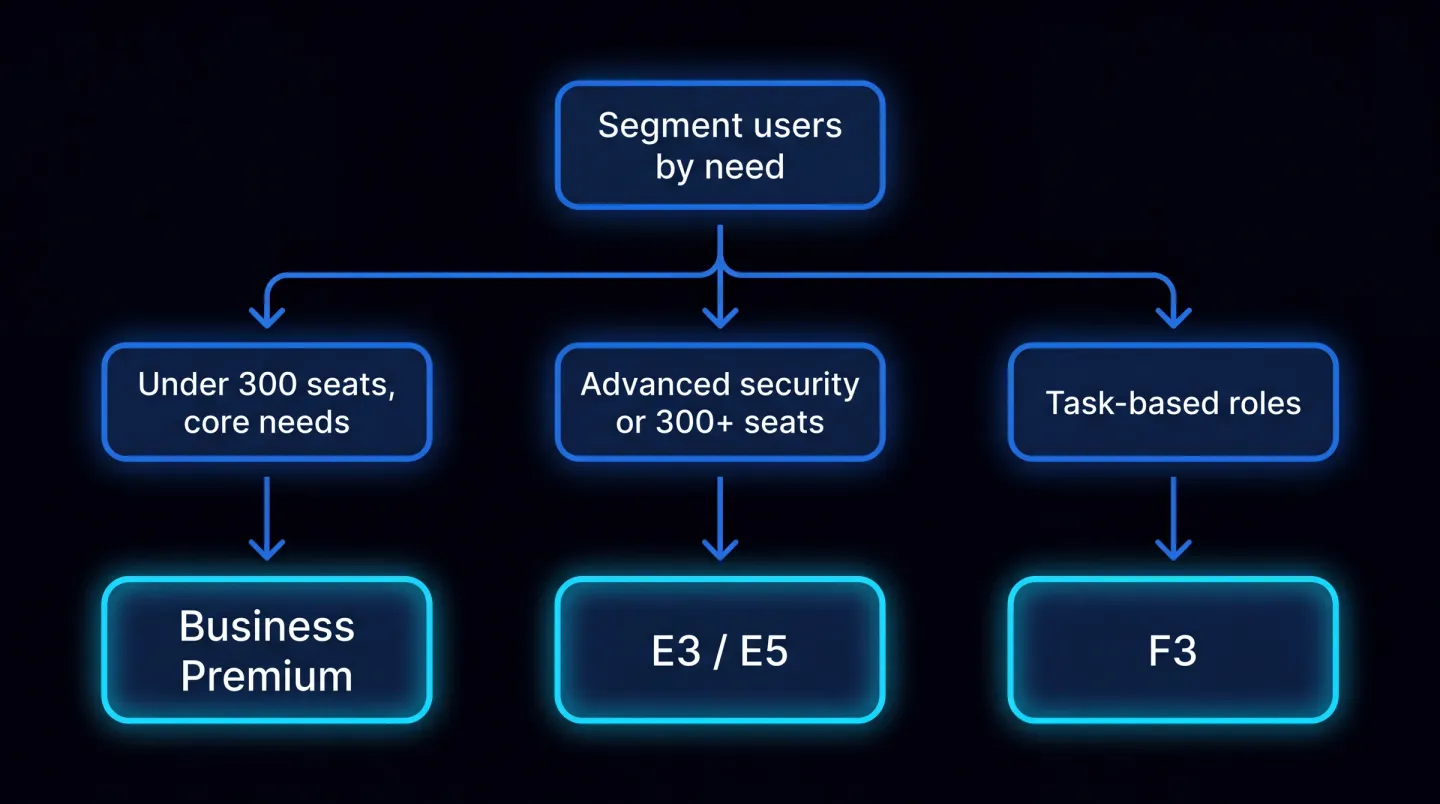
A simple decision tree: segment by need first, then map each cohort to Business Premium, E3, E5 or F3.
Mixing plans in one tenant is normal
A common worry is whether different plans can coexist in one tenant. They can, and doing so is standard practice rather than a workaround. A single Microsoft 365 tenant can hold Business plans alongside enterprise and frontline plans and add-ons, with each user assigned the plan their cohort needs, and group-based licensing makes those assignments manageable at scale. The only constraint to keep in mind is that the 300-seat ceiling applies to the Business family specifically, so a growing organisation eventually shifts its knowledge-worker cohort onto E3 or E5 while keeping frontline users on F3.
For the managed-service providers who run this across many tenants, the same principle applies per client: one deliberate mix per tenant beats one blanket plan everywhere.
Review on joiners, movers and leavers
A plan mix is only right on the day you set it. People join, change roles and leave, and each of those events is a moment for the licence to drift out of step with the need. Tie a licence review to the joiner, mover and leaver process so that a new starter lands on the right cohort's plan, a role change triggers a plan change rather than an accumulation of entitlements, and a leaver's licence is reclaimed promptly instead of billing on. A light periodic sweep on top of that keeps the mix honest as the organisation evolves.
Where EtherInsights fits
Working a plan comparison by hand, and keeping it accurate as an estate changes, is where the effort adds up, especially across several tenants. EtherInsights is built to make the plan mix visible and keep it matched to need: it surfaces which users hold which plan, highlights seats whose assigned capabilities go unused, and gives the evidence to move cohorts onto a better-fitting plan with confidence rather than guesswork.
On the lifecycle side, Microsoft 365 licence management and offboarding closes the loop so plans stay matched through every joiner, mover and leaver, and dormant seats do not linger. A natural first step is to find unused Microsoft 365 licences before you reshape the mix. Seen alongside broader cloud cost optimisation, the plan mix stops being an annual renewal scramble and becomes a controlled, evidence-backed part of running the estate.
Get the plan mix right and you pay for the capabilities your people actually use, not the ones a single blanket plan happened to include.
Explore Microsoft 365 licence management and offboarding to match every cohort to the right plan and keep it that way.