
Converting legacy Windows applications to MSIX means taking an older application, whether it arrived as a setup.exe, a legacy MSI, an App-V or ThinApp package, or a live installation whose media disappeared years ago, and rebuilding it as a signed MSIX package that installs and uninstalls cleanly on Windows 11 and deploys through Microsoft Intune. Organisations choose the legacy to MSIX route because the modern container format brings predictable install hygiene, a clean path to Azure Virtual Desktop and Windows 365, and a supportable way to keep decades of line-of-business software running while older packaging formats are retired. This guide covers the whole journey: what counts as legacy, why MSIX is the target, the conversion routes compared, what tends to break, when MSIX is the wrong answer, and a practical workflow you can follow application by application.
What counts as a legacy Windows application
Legacy has less to do with age than with how an application was packaged and how much of its original context still survives. Several patterns turn up in almost every estate.
- setup.exe and legacy MSI installers. Vendor installers built for Windows 7 or early Windows 10, often with hard-coded paths, custom actions, and silent-install switches nobody documented.
- App-V packages. Virtual application packages from an App-V estate that now needs a forward plan, especially where the App-V server side has reached the end of its supported life.
- ThinApp and other virtualised formats. Applications wrapped in an older virtualisation format that the organisation is moving away from as it standardises on a single modern container. An App Volumes application migration usually surfaces the same set of applications.
- Applications with lost installation media. Software that runs happily in production but whose installer has vanished because the vendor wound down, the download portal is gated, or the media lived on a share that was tidied away.
- Applications captured from older Windows versions. Line-of-business tools that were only ever installed on Windows 7 or early Windows 10 reference machines and now have to move to a current baseline.
The common thread is that the running application, not a pristine installer, is often the most reliable source of truth.
Why MSIX is the modern target
MSIX is a containerised packaging format that isolates an application's files and registry writes from the rest of the system, so installs and uninstalls are clean and leave little behind. That hygiene is the headline reason teams standardise on it, but three practical benefits usually seal the decision.
It runs where modern estates run. MSIX is supported natively on Windows 10 version 1709 and later, and on Windows 11, so a converted package targets the platforms most organisations are already moving to. Older Windows versions need the MSIX Core compatibility layer.
It fits cloud and virtual delivery. MSIX app attach dynamically attaches an application to a user session on Azure Virtual Desktop without installing it on the session host, which keeps images lean and separates the application lifecycle from the operating system. On physical devices and Windows 365 Cloud PCs, the same signed MSIX deploys through Intune to managed endpoints.
It deploys through the tools you already run. A signed MSIX is added to Intune and assigned to users or devices in staged rings. Signing is not optional: Windows requires every MSIX package to be signed with a certificate that chains to a root the device trusts, and it will not install an unsigned package. There is no vendor signature to inherit from a captured application, so the package takes your organisation's own code-signing certificate.
The conversion routes compared
There is no single road from legacy to MSIX. The right method depends on whether the source installer survives, how many applications you are moving, and how complex each one is. Compared by method rather than by product:
| Method | Best for | Automation level | Watch-outs |
|---|---|---|---|
| Manual repackaging with the MSIX Packaging Tool | A handful of applications with clean installers or awkward install logic that needs a human eye | Low, hands-on throughout | Slow and hard to repeat identically between packagers |
| Scripted or batch conversion via the packaging tool command line and template files | Larger estates where many installers convert in bulk | High, template-driven runs | Needs solid templates and per-application validation afterwards |
| Capture-first conversion on a controlled clean VM with AI-guided review | Applications with lost media, older virtualised formats, or complex footprints | High, agentic with human review | Confirm licensing rights before recapturing an installed application |
The Microsoft MSIX Packaging Tool underpins the first two routes. It creates an MSIX package from an MSI, EXE, ClickOnce, App-V 5.1, or script installer, and for App-V it converts the 5.1 format directly while 4.x packages are converted from their source installer instead. For bulk work, the same tool runs from the command line against a conversion template that carries the package information and settings, so one configuration can be reused across many applications and later versions:
MsixPackagingTool.exe create-package --template C:\conversions\LineOfBusinessApp.xml -v
Generate the template once through the tool's interface, then reuse it for scripted runs. Where the installer is missing entirely, capture-first becomes the practical route: the running application is captured from a live, clean machine and rebuilt as a package, which is the ground the capture-first path to MSIX for complex applications covers in depth.
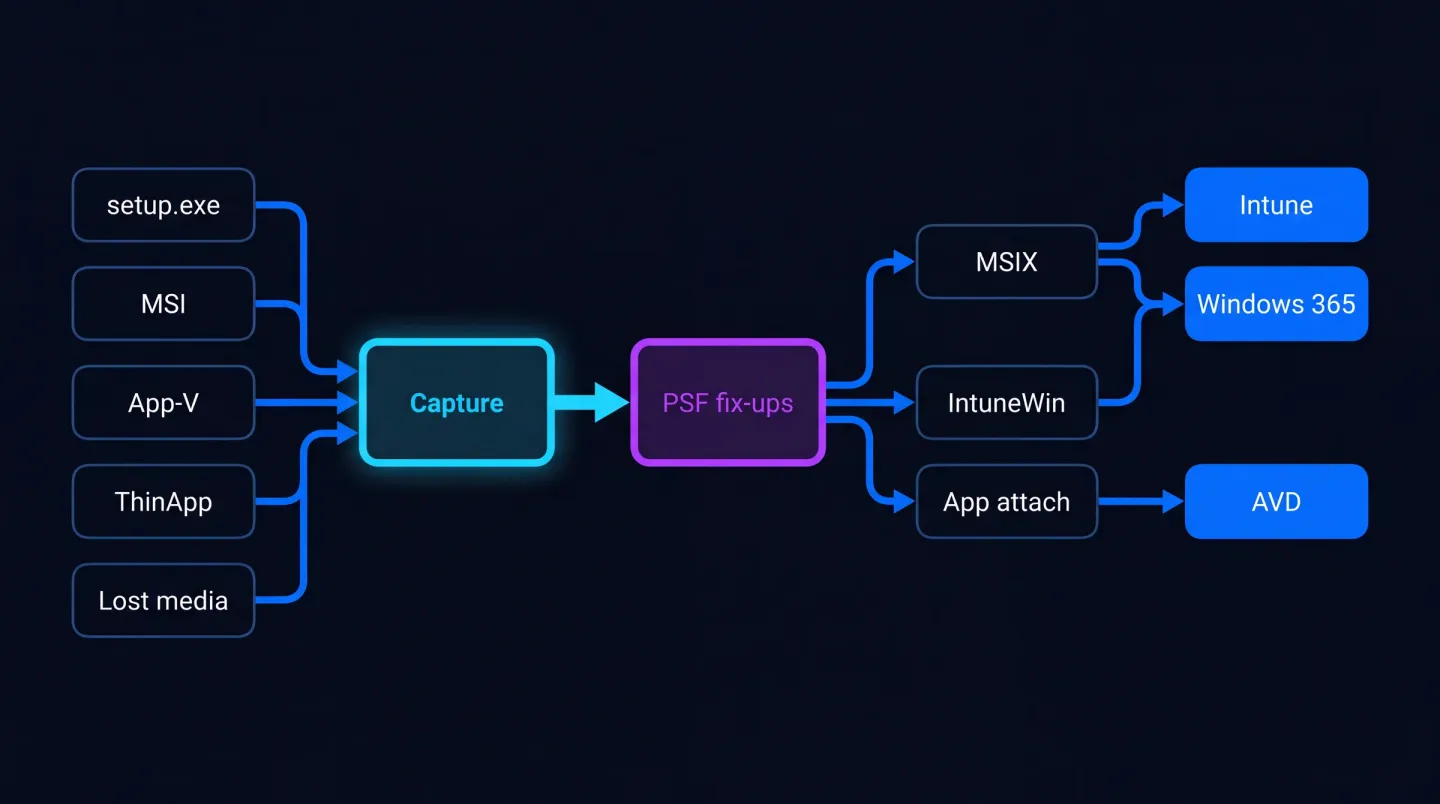
Legacy sources flow through capture and remediation into modern outputs deployed across Intune, Azure Virtual Desktop, and Windows 365.
What commonly breaks, and how PSF helps
A converted package that installs is not the same as one that works. Because MSIX runs the application inside a container that redirects certain file and registry writes, some behaviours that were fine on a traditional install start to fail.
The usual culprits are an application that writes into its own install folder, one that depends on a specific working directory the container does not set, and one that expects parameters or an environment variable at launch. These are exactly what the Package Support Framework (PSF) exists to remediate. PSF is an open-source kit from Microsoft that applies targeted fix-ups to an application without touching its source code, so it behaves inside the container. It can correct the working directory, redirect file writes to a supported location, and run a script at launch to prepare the environment the application expects.
Two limits are worth knowing before you start. MSIX does not support Windows drivers, so an application that installs a kernel-mode driver will not containerise cleanly. Services are supported, but only from Windows 10 version 2004 onward and only as per-machine services running under a system account; per-user services are not supported, and a service package needs administrator rights to install. Per-user configuration also matters: a machine-level capture will not carry licence files or first-run state written into a user profile, so that state has to be handled deliberately.
When MSIX is the wrong target
MSIX is the right destination for most desktop applications, but not all of them, and forcing it is a common cause of rework. Choose a different output when an application requires a Windows driver, depends on a per-user service, or relies on deep shell or COM integration that has to be visible outside the package. In those cases a signed MSI keeps the application deployable while respecting what the container cannot do, and a captured payload can sit alongside it. Where the immediate need is cloud-managed delivery rather than containerisation, an IntuneWin package, the Win32 application format built with the Microsoft Win32 Content Prep Tool, deploys through Intune just as readily. The discipline is to let each application's footprint decide the format, rather than committing every application to MSIX before you understand it.
A practical legacy to MSIX workflow
Whatever the mix of sources, the same sequence keeps the work predictable.
- Inventory. List every application, its owner, version, install source, and whether the original media still exists.
- Rationalise. Retire what nobody uses and consolidate duplicates before spending any effort, so you only modernise what earns its place.
- Choose a route per application. Use the inventory to point each application at manual, scripted, or capture-first conversion, and flag the ones better suited to MSI or IntuneWin.
- Capture or convert on a clean VM. Work on a clean, patched Windows 11 machine so you package the application and not the clutter of a working desktop.
- Remediate. Apply PSF fix-ups where the container changes behaviour, including a launch script where one is needed.
- Test on representative devices. Check launch, core workflows, licensing activation, per-user settings, and uninstall on devices that match the target estate.
- Sign. Sign each package with a trusted code-signing certificate whose identity matches the manifest publisher.
- Deploy through Intune in rings. Assign a pilot ring first, then widen so any issue surfaces on a few devices rather than across the whole estate.
The stubborn cases, lost media and older virtualised formats, are where a capture-led approach earns its keep. Our guides on how to repackage an application when the installer is lost and an App-V to MSIX migration go deeper on those two paths, and modernise legacy Windows applications covers the assessment that sits in front of them.
Where EtherApps Forge fits
Most of the difficulty in a legacy to MSIX programme sits in the tail: the applications with no installer, an older virtualised format, or a footprint too complex to convert blind. EtherApps Forge is built for that tail. It is a Win32 application you deploy inside your own environment rather than a SaaS service, so captures and packaging stay within your control, and it captures applications from older Windows versions as well as current ones, which is exactly what a legacy estate needs.
The workflow is agentic app packaging with human review: an AI Controller, running on a VM in Azure inside your own controlled environment, analyses the captured footprint and recommends a route across MSIX, MSI, IntuneWin, and app attach, while a packager confirms the decision rather than pretending difficult applications package themselves. Every licence includes training and support, and a free 7-day trial lets a packaging or endpoint team prove the outcome on one real application before committing the wider estate. For the delivery side, MSIX packaging and deployment covers signing, PSF review, and Intune rollout, and agentic application packaging explains the capture-and-review model in full. You can see the product itself on EtherApps Forge.
Legacy to MSIX is a decisioning job before it is a packaging job: inventory the estate, route each application to the method that fits, remediate what the container changes, sign the result, and deploy through Intune with confidence.
Modernise your legacy Windows applications with an assessment and capture-first approach that turns undocumented software into signed, deployable packages.