
Can an automated workflow turn existing Windows applications into MSIX packages across thousands of cases, not just a handful of demonstrations? Our new study says yes for a large share of the cases we attempted: of 3,261 application cases, 2,957 produced an MSIX package (90.68%) and 2,610 recorded a complete smoke-test pass (80.04%). The paper, "MSIX at Scale: An Automated Packaging Study of 3,261 Windows Application Cases", is available now on Zenodo under a CC BY 4.0 licence with the DOI 10.5281/zenodo.21985871, alongside a supplement that lets anyone recalculate every figure.
If you run an application estate for a 50 to 600 user organisation, or you package applications for customers as an MSP, the question behind this research is a familiar one. You have installers, MSI files, ZIP archives and portable tools in every shape imaginable. Repackaging them by hand is slow, each packager does it slightly differently, and the backlog rarely shrinks. The study asks whether that work can be repeated reliably at volume, and it is careful about what "worked" means.
What the study measured
MSIX is Microsoft's package format for installing and managing Windows applications. A package brings the application files together with a manifest that tells Windows what the package contains and how its applications start. Microsoft's own conversion guidance treats preparation, capture, package creation and testing as separate steps, and the study keeps those steps separate too.
We analysed records, finalised on 27 June 2026, for every case where an MSIX packaging attempt was recorded. The applications came from searches of the public Windows Package Manager (WinGet) catalogue. Every attempted case counts in the denominator, including the ones that stopped early, so the headline percentages cannot be inflated by quietly dropping failures.
Each case was reported at four stages:
- Package produced: the MSIX build completed.
- Installed and registered: the package installed for a test user and Windows registered it.
- Entry point started: a selected program inside the package launched.
- Complete smoke-test pass: installation, launch, closure and cleanup were all recorded as successful, with no crash detected.
A smoke test is a short first check, not a full test. It confirms that a package installs, that a selected program starts, and that the test closes and cleans up. It does not test signing in, editing a document or saving data. We kept that distinction visible throughout the paper, and we keep it visible here.
The results
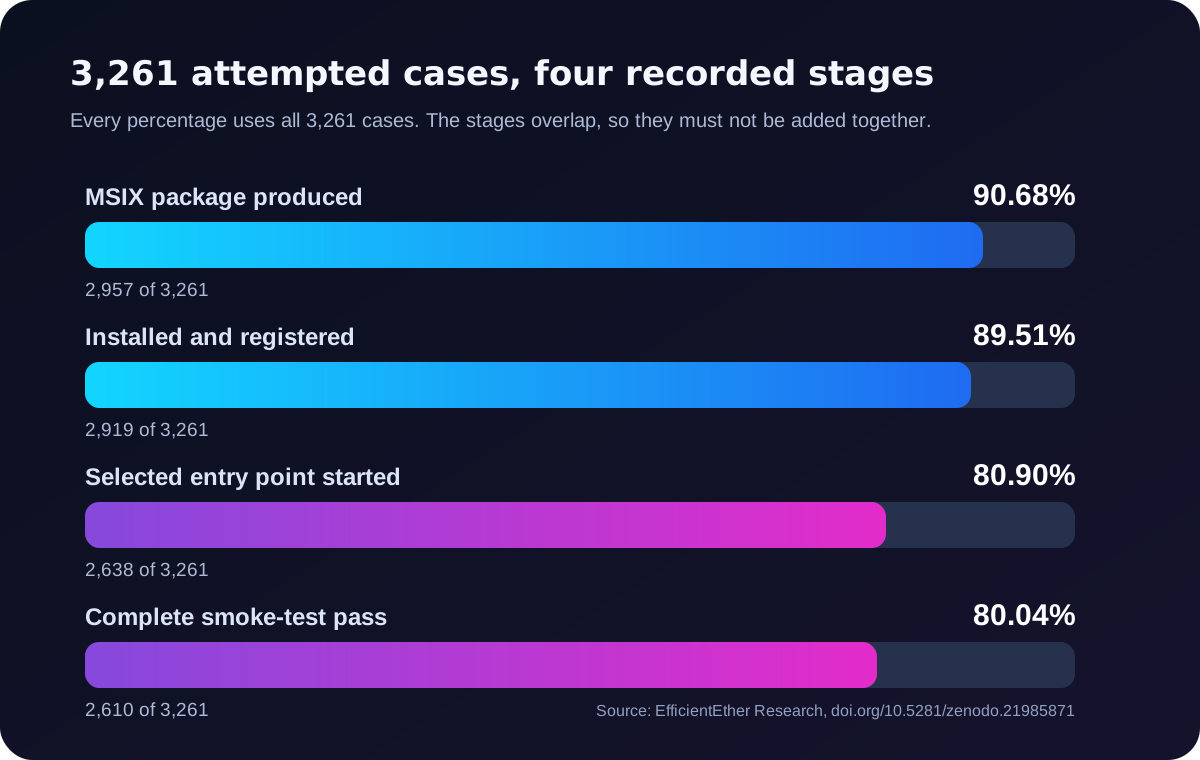
Each percentage uses all 3,261 attempted cases. The stages overlap, so they must not be added together.
Look at where the cases fall away. 304 attempts did not produce a package, but almost as many, 281, installed and registered cleanly and then did not record a program starting. That is the practical lesson for any packaging programme: a package file existing on disk, or even installing cleanly, is not the same as an application that runs. Build success and application success need to be reported separately, or a migration plan will look healthier than it is.
Passes also came from every source type in the study. Here are the complete smoke-test passes by installer or distribution type:
| Installer or distribution type | Complete passes | Cases attempted | Pass rate |
|---|---|---|---|
| Portable | 253 | 263 | 96.20% |
| Nullsoft | 768 | 895 | 85.81% |
| Inno Setup | 694 | 811 | 85.57% |
| ZIP | 207 | 255 | 81.18% |
| Burn | 43 | 54 | 79.63% |
| WiX | 317 | 423 | 74.94% |
| Generic EXE | 220 | 357 | 61.62% |
| MSI | 108 | 203 | 53.20% |
| Total | 2,610 | 3,261 | 80.04% |
These groups contain different applications with different requirements, so the table does not show that an installer type causes a higher or lower chance of success. What it does show is that successful results were not confined to one kind of installer. That matters when your estate is a mix of all of them.
How we checked the evidence
Numbers like these deserve scrutiny, so the paper describes how they were tested before we published them.
- Every pass was checked against its saved report. All 2,610 recorded smoke passes were compared with their linked original test reports across the six test-stage fields. All of them matched.
- Duplicate reports were identified. File fingerprints showed six pairs of cases sharing identical reports, so the paper counts catalogue cases and saved results, not independent test runs.
- We reported the awkward finding. Two passing cases started a deactivation utility rather than the main application, and the automated identity check did not flag it. They stay in the total under the stated rule, and the paper uses them as the clearest example of why a launch is not proof that the intended application works.
- Retries are disclosed. The saved histories hold 3,942 attempt summaries: 2,712 cases had one attempt, 417 had two and 132 had three. These are workflow results, not first-attempt success rates.
The supplement includes the case-level results, selection notes and Python scripts that reproduce every table and percentage.
What the study does not claim
The limits are as useful as the results, particularly if you plan to share this research with others in your organisation.
- It is not a general compatibility rate. The applications were drawn from catalogue searches, not a random sample, and they do not represent your application list or Windows software in general.
- It is not proof of production readiness. Business-task testing, long-term reliability and deployment to end users were not measured.
- It does not measure time or cost savings. There was no comparison with manual packaging or other approaches.
- It has not been independently repeated. The paper is a preprint and has not been peer reviewed. I develop EtherApps Forge, the tool used in the study, and have a commercial interest in the results. That relationship is declared in the paper and should be weighed by every reader.
A case without a successful result is also not evidence that the application cannot work with MSIX. Some applications need fix-ups, a different package format, or a closer look.
What this means for your packaging programme
For IT leaders and MSP principals, the research supports a clear position: MSIX is a practical packaging option for suitable existing Windows applications, and it belongs in your packaging strategy. It should not be mandatory for every application, and the decision is best made application by application.
For the practitioners doing the work, the paper points to a decision process you can apply to your own estate:
- Test with your own applications. Evaluate MSIX against the applications your organisation actually runs, not a vendor's sample list.
- Keep the stages separate. Record package creation, installation, the initial check and business-task testing as distinct results.
- Confirm the right program starts. Check that the launch test selects the intended main application, not a helper or utility.
- Test real work. Sign-in, file handling, integrations, updates and longer use, then deployment on clean target devices.
- Route the exceptions. Applications that need drivers, services or machine-wide changes may belong in another format. The capture-first path to MSIX for complex Windows applications covers how to make that call.
Keep full-trust behaviour in mind too. Microsoft's containerisation guidance notes that a full-trust packaged desktop app runs with the same permissions as a standard desktop app, so MSIX gives you clean installation and removal, not an automatic security boundary.
If you need to take this to a change board or a customer, the DOI and the reproducible supplement give you evidence you can forward and others can check.
Where EtherApps Forge fits
EtherApps Forge was the workflow used throughout the study. It checked each source, captured the application's files and settings, built and signed the MSIX package, then installed, launched and cleaned it up as a first test. The paper's conclusion is deliberately measured: EtherApps Forge can help you turn suitable existing application sources into MSIX packages ready for your own validation. It is not a claim of fully unattended, production-ready migration.
EtherApps Forge is a Windows desktop application that runs in your own environment, so captures and packages stay with you. Its agentic application packaging workflow recommends a route from the real application footprint, and its Package Support Framework fix-ups help captured applications that need file or registry redirection. For estates with years of accumulated installers, legacy application modernisation covers discovery and remediation. Earlier papers from the same research programme look at native MSIX versus App Attach for Azure Virtual Desktop and where the Package Support Framework adds MSIX and App Attach risk.
The fastest way to see whether your own applications behave like the cases in the study is to run them through the same workflow. EtherApps Forge includes a free 7-day trial of the full workflow, and every licence includes training and support.
Explore MSIX packaging and deployment to see how the study's four-stage evidence becomes a repeatable packaging and delivery process for your estate.