
If you run Azure Virtual Desktop and want to know whether Windows 365 would cost you less, you can now get a directional answer in about two minutes. The free Windows 365 TCO calculator takes your current AVD monthly run cost and your user counts, then compares them against the current Microsoft retail baseline for the Windows 365 model that actually matches your deployment. There is no signup and no sales call in front of the number.
That free number is only as good as the figures you type into it. If you want one that reflects what your estate is actually doing, the 14-day free trial of EtherInsights runs the same comparison against your own tenant: real cohorts, real usage, real run cost, with nothing estimated by hand. Use the calculator for the direction of travel, and the trial when the number has to stand up.
What the calculator answers
The question most teams are really asking is not "what does a Cloud PC cost", because that price is published. It is "does my estate, at my current run rate, come out cheaper on a flat per-user licence than it does on variable infrastructure". That depends on numbers only you have: what you are actually spending on hosts, storage and profiles today, and how many people genuinely need a desktop at the same time.
So the calculator asks for three things:
- Your deployment type. Personal, dedicated desktops, or pooled and shift-based usage. This is the input that changes everything else.
- Your user count. For personal estates, the number of dedicated desktops. For pooled estates, your peak concurrent AVD users rather than your total headcount, because concurrency is what pooled infrastructure is sized for.
- Your current AVD monthly run cost. The total you pay today, which is the only honest starting point for a comparison.
From those it returns a monthly, annual and term comparison, the difference either way, and the percentage change.
Why deployment type drives the result
Personal and pooled estates compare against different Windows 365 products, and using the wrong one is the most common way these comparisons go wrong.
Personal, dedicated desktops map to Windows 365 Enterprise, where each user has a persistent Cloud PC of their own. The calculator's default baseline is Windows 365 Enterprise Standard at 2 vCPU, 8 GB RAM and 128 GB storage, currently £35.60 per user per month on Microsoft UK retail pricing. That is a like-for-like swap: one person, one desktop, all day.
Pooled, intermittent and shift-based usage maps to Windows 365 Flex, which provisions Cloud PCs for non-concurrent use. It suits rotation schedules, part-time and contingent staff, and shift patterns where not everyone is active at once. Because Flex is licensed against concurrency rather than headcount, a 400-person pooled estate with 120 peak concurrent users is a very different calculation from a 400-person personal estate. See concurrency before configuration for Windows 365 Flex for how to size that concurrency figure before you rely on it, and the desktop segmentation model for splitting a mixed estate into the cohorts this calculator expects as separate inputs.
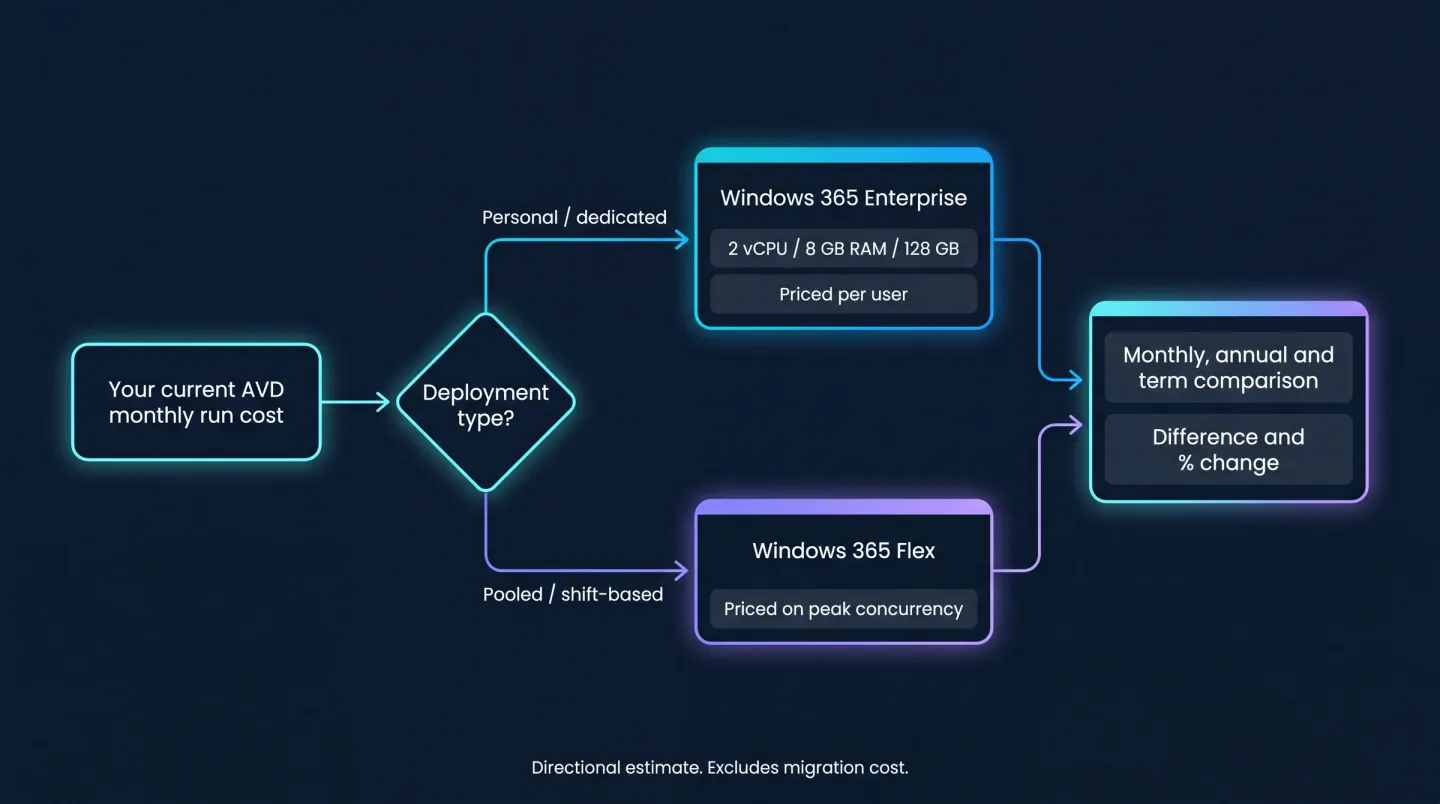
One input, one decision: deployment type picks the Windows 365 product you are actually compared against.
If you compare a pooled estate against Enterprise pricing on total headcount, you will produce a number that looks alarming and is simply wrong. The deployment-type question exists to stop that.
What the number is, and what it is not
This is a directional estimate, not a quote. It is deliberately a first-pass sales tool rather than a spreadsheet clone, and it is worth being clear about the limits:
- It uses a single retail baseline per deployment type, not your negotiated pricing, agreement discounts or regional variation. The baseline and the date it was checked are shown on the result so you can see what it assumed.
- It compares run cost, not migration cost. Project effort, pilot time, image rebuilds for pooled estates and the period where you run both platforms in parallel are not in the figure. For that fuller picture, see what an AVD to Windows 365 migration actually costs.
- It does not model your workloads. High-density multi-session and GPU-backed users often remain a better fit on AVD, and no per-user licence comparison will surface that on its own.
Treat the output as a signal about which direction to investigate, and which cohorts are worth a proper look. A result that lands within a few percent either way is a prompt to model it properly, not a decision.
From an estimate to a plan
The calculator's weakness is the same as its strength: it works from figures you type in. A single blended AVD run cost across a mixed estate hides the thing that usually decides the outcome, which is that different cohorts should go different ways. Most estates are not one answer. They are personal desktops that move cleanly, shift workers who suit Flex, and a smaller set of multi-session or GPU users who should stay where they are.
Getting from a typed estimate to that per-cohort picture is where the 14-day free trial of EtherInsights comes in. Connected to your tenant, the automated assessment reads the estate rather than asking you to describe it: where your Cloud PC and AVD users actually sit, how they are really being used, and which cohorts stand up as migration candidates. The same platform covers the rest of the Microsoft estate too, including Microsoft 365 licence waste, Azure cost, security posture and Copilot readiness, so the desktop question lands in the context of everything else you are paying for.
Once you have cohorts you trust, Windows 365 migration turns them into a sequenced, waved plan with day-two running cost in view, and the result folds into wider cloud cost optimisation so the desktop estate keeps paying only for the work it supports.
Run your own numbers before you form a view. A directional figure built from your real run cost beats a generic industry average every time. The TCO comparison answers the "should we move" question; day-two Cloud PC management is the "how do we run it well once we have" question that follows it.
Try the free Windows 365 TCO calculator for a directional answer in two minutes. Then start a 14-day free trial to run the full cost assessment against your own tenant, and get the per-cohort picture behind the number instead of a figure you typed in yourself.